
The easiest website to launch isn’t always the easiest to grow. If you’re weighing up custom website vs template Australia options, the right choice depends on what your business needs now, how much control you want and what may change later.
A website builder can make it easier to get online yourself. A template gives you a ready-made layout to adapt. Custom development offers a different path when your requirements don’t fit neatly into standard tools. Each option has trade-offs, and a polished-looking site alone won’t tell you what’s included, who handles updates or how easy it’ll be to make changes.
This guide compares builders, templates and custom websites in practical terms, so you can choose based on your goals and technical confidence, not hype. We’ll cover flexibility, room to grow, ongoing responsibilities and the questions to ask before you commit to a platform or provider. You’ll leave with a clearer view of what suits your business now, and what to check so your choice doesn’t become a roadblock at the next stage.
Key Takeaways
- “Website builder” can mean a DIY platform, a ready-made template or a professional service. Knowing the difference makes comparisons clearer.
- In the custom website vs template australia decision, weigh setup effort, editing confidence and room for future changes, not just the finished design.
- Match your website approach to your business model, must-have features and what you want the site to do.
- Use a practical checklist to clarify essential pages, functions, editing needs and likely changes before choosing a platform or provider.
- Before committing, confirm what’s included, who handles ongoing responsibilities and what happens if your needs change.
What does “best website builder in Australia” mean for your business?
Searching for the best website builder can get confusing fast. The phrase might mean a DIY platform you use yourself, a template you customise, or a professional who builds a website for you. These are different parts of the process, not three names for the same thing.
In plain English: A Website builder is a tool or service that helps create a website, often through visual editing rather than writing code. Some platforms also provide hosting, but the exact setup and responsibilities depend on the provider.
It helps to separate the jobs involved. A platform can provide the tools to build and publish a site, and may also host its files online. The design work decides how the site is organised and looks. Its content explains what your business does, while its features help visitors take action, such as enquiring or placing an order. One platform may cover several of these jobs; a template or developer may shape others.
So, the custom website vs template australia choice isn’t about finding one approach that always wins. It’s about matching the work, tools and ongoing responsibilities to your business goals and the time or skills you can bring.
What is the difference between a website builder and a website template?
A website builder is the tool or platform. A template is a starting design used to arrange pages and content. You might choose a template within a DIY platform, then change its text, images and layout using the platform’s editing tools. A developer can also adapt a template as part of a professionally built site. The template provides a starting point; it isn’t the tool itself.
Before choosing, check what you can edit and what the provider will handle. Those details can vary between platforms, templates and professional services. A design preview shows how a site could look, but not necessarily how much work it takes to set up or maintain.
What does a custom website mean in this comparison?
Custom development means shaping a website around specific business requirements, rather than relying entirely on a ready-made layout and standard options. That could mean planning page structure around how customers find information, or tailoring a booking flow to the way a business accepts and manages appointments.
Custom doesn’t automatically mean every feature is coded from scratch. Existing tools or components may still be used where they fit. The useful question is whether the finished setup meets your needs, and whether the scope makes clear what’s being built, what can be changed later and who is responsible for ongoing updates.
For Australian businesses, compare the options on practical fit: your required features, confidence with editing, and capacity to manage the site. A DIY platform may suit someone who wants direct control. A professionally built package or custom development may suit a business that wants help with setup or has specific requirements. Neither choice is automatically better. The right starting point is knowing what the website must do, and what you’re prepared to manage.
Website builder vs template vs custom website: what changes in practice?
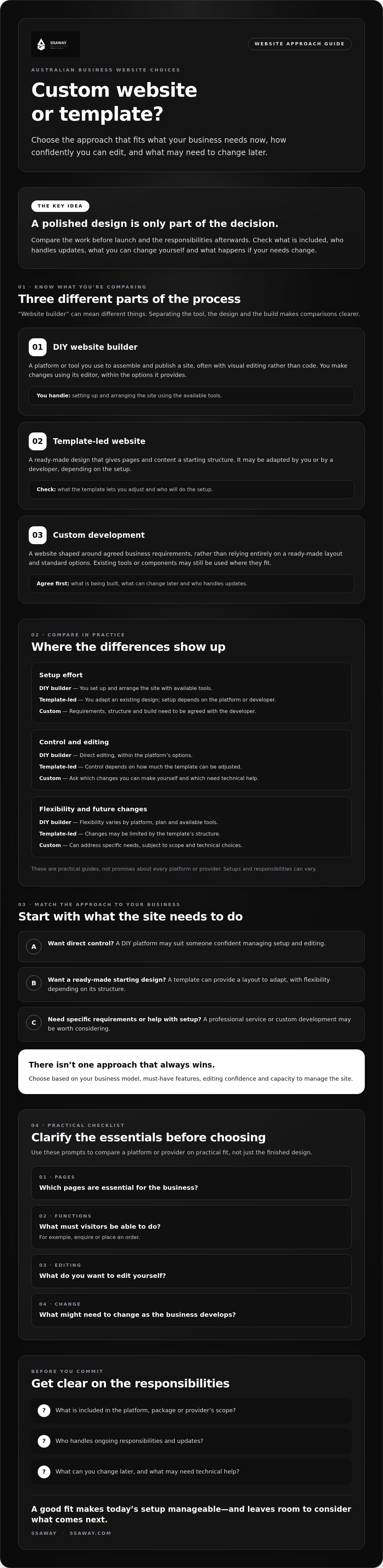
The practical differences show up in the work before launch and the responsibility afterwards. A DIY builder gives you tools to assemble a site. A template supplies a ready-made layout. Custom development shapes the site around agreed requirements. These approaches can overlap, so treat the comparison below as a guide, not a promise about every platform or provider.
| Factor | DIY website builder | Template-led website | Custom development |
|---|---|---|---|
| Setup effort | You set up and arrange the site using available tools. | You adapt an existing design; setup depends on the platform or developer. | Requirements, structure and build need to be agreed with the developer. |
| Control | Direct editing, within the platform’s options. | Control depends on how much the template can be adjusted. | Decisions are shaped by the agreed scope and build. |
| Flexibility | Varies by platform, plan and available tools. | Changes may be limited by the template’s structure. | Can address specific needs, subject to scope and technical choices. |
| Editing | You make changes using the platform’s editor. | You, or a provider, edit within the chosen setup. | Ask which changes you can make yourself and which need technical help. |
| Ongoing responsibility | Check what you manage and what the platform handles. | Confirm who updates the site and supports the template. | Agree who handles updates, support and future changes. |
What do DIY website builders make easier?
Visual editing and pre-built layouts can help you arrange pages without writing code. Common tools may also be available, but you still need to choose the design, prepare useful content and check how the site works for visitors. Before signing up, check the platform’s current plan limits, available integrations and whether you can export your content or site data. The Australian Government's guide to setting up a business website outlines key decisions, including whether to use a template or hire a designer.
Where can templates and custom development differ?
A template gives you a structure to adapt, but its layout may constrain unusual requirements. Custom development may better suit a particular workflow, such as a booking process with specific steps or information. That doesn’t mean every component must be built from scratch. In either case, clarify who handles updates, support and technical issues, and what ongoing help is included.
Search visibility isn’t guaranteed by choosing a custom build. SEO depends on how the site is implemented and the quality and usefulness of its content, not the label attached to the approach. The custom website vs template australia decision should come down to fit: what you need the site to do and what you can manage.
If a DIY tool or off-the-shelf template doesn’t suit your requirements, compare professionally built website packages and custom development. SSAWAY lets clients review and approve the completed website before payment, with no upfront payment required.
Which website approach suits your Australian business goals?
Start with the job your website needs to do. A business taking enquiries has different needs from one selling products online. Then consider how often you’ll update the site, what features customers need and how comfortable you are managing the setup. These factors matter more than whether an option sounds more advanced.
A professional website doesn’t have to be custom-built. A well-chosen builder or template can present a business clearly if it supports the pages and functions required. On the other hand, a DIY platform isn’t automatically the right fit just because it gives you editing tools. Your workflow and plans for the site still need to fit its capabilities.
When could a website builder or template be enough?
If your site mainly needs to explain what you do, show service information and help customers get in touch, a builder or template may cover the essentials. It can be a sensible fit if you’re comfortable writing and updating content, making design choices and handling platform settings.
Think beyond launch, too. Could you add a service page or change how customers enquire without rebuilding the whole site? Check the available options before committing. A simple setup can work well, but only if it leaves a practical way to respond as your business and customers’ needs change.
When might custom website development make more sense?
Consider custom development if a key part of your business depends on a workflow that standard tools don’t support well. For example, a business might need customers to submit information in a particular order before an enquiry can be reviewed. A template may not handle that process as required, while a tailored build could be scoped around it.
Custom work may also suit you if you want professional help planning the site structure or implementing specific features. That doesn’t mean custom is automatically necessary, or that everything must be built from scratch. First, confirm what standard tools can already do. Then compare that with the exact gap you need to solve.
Before choosing, write down your answers to these four questions:
- Business model: Do you mainly provide information, take enquiries, sell products or support another customer process?
- Site goal: What should visitors be able to do, and what information will help them do it?
- Editing confidence: Will you make routine changes yourself, or would you prefer someone else to manage the build?
- Required features: Which functions are essential now, and which are only possibilities for later?
This makes the custom website vs template australia choice more concrete. If a template meets your needs and you can manage it, custom work may add complexity without solving a real problem. If a required workflow doesn’t fit available tools, document that gap and ask a provider to explain the proposed scope, ongoing support and alternatives. Choose for fit, not for status.
How to choose a website builder or website approach: a practical checklist
Before you choose a platform, template or provider, get clear on what you need and what happens after launch. Use this checklist to compare options on the same terms. It can also help you spot missing details before you agree to a project.
- List the must-have pages. Note what visitors need to find, such as service information, product details, contact options or answers to common questions.
- Write down essential functions. Be specific about what customers need to do, such as submit an enquiry, book a service or browse products. Separate must-haves from ideas for later.
- Decide who will edit the site. Will you update text and images yourself? Ask to see how editing works, and find out which changes might require technical help.
- Think about likely changes. Consider whether you may add services, pages or new ways for customers to interact with your business. Check how the option could accommodate those changes.
- Check access and ownership. Ask who controls the domain, website content, images and relevant accounts. Confirm what you can access and how information could be moved if you leave.
- Confirm ongoing responsibilities. Find out who handles hosting, updates, backups and troubleshooting, and what support is included after launch.
- Verify platform details. Check current plan terms, integrations and limits against your requirements. Confirm migration options and available search engine optimisation settings directly with the platform or provider.
What should you ask a web design provider?
Ask for a written scope that lists the pages, functions and revisions included, along with post-launch responsibilities. Clarify who supplies the content, what you can edit yourself and what would count as additional work. Ask who can review the finished website, how approval works and when payment becomes due. Clear answers help you compare providers fairly.
The custom website vs template australia decision is easier when you compare the actual scope, not just a design preview. If a provider’s terms are unclear, pause and ask for specifics before committing. For a professionally built option, explore website packages and custom development. SSAWAY’s process allows clients to review and approve the completed website before payment, with no upfront payment required.
From website builder comparison to a confident next step
The choice is simpler once you focus on what your business needs. Choose a website builder if you want to make and manage changes yourself. A template can give you a ready-made design to adapt. Custom development may suit specific requirements that standard tools don’t meet. None is automatically the best option for every Australian business.
Look past the design preview. Ask what the proposed scope includes, who handles updates and support, and what happens if you want to change the site later. A polished mock-up doesn’t explain how the website will work or what you’ll be responsible for after launch.
What happens when you choose a professionally built website?
Start by describing your audience, the site’s purpose, the pages visitors need and the functions they’ll use. For a focused online presence, a one-page website package may be worth considering. A clear list of requirements also helps you compare a defined package with custom development and see whether extra features are necessary.
SSAWAY provides one-page, shopfront and e-commerce website packages, as well as custom web development. These are professionally built options, not subscriptions to third-party website builders. Clients can review and approve the finished website before payment, and no upfront payment is required.
What is a sensible next step if you are still unsure?
Separate essential features from optional additions. For example, note whether customers must be able to buy online at launch, or whether that’s a possible future change. Then compare written scopes and approval processes. Check that each provider explains what’s included, what you can review and when payment is due.
The custom website vs template australia decision doesn’t need to be made on hype or assumptions. Match the approach to the work your site needs to do, and make sure you understand the ongoing responsibilities before committing. If you’re considering a professionally built option, you can explore SSAWAY’s website packages and custom development to see whether the scope fits your needs.
Choose the website path that fits your next stage
The best choice isn’t the one with the most features. It’s the one that supports your business goals without leaving you unclear about who manages the site or what happens next. For the custom website vs template australia decision, focus on practical fit, clear scope and ongoing responsibilities, not assumptions about which option looks more professional.
If you’d rather have a website built for you, SSAWAY offers one-page, shopfront and e-commerce website packages, as well as custom development. There’s no upfront payment required. You can review and approve the finished website before payment, so you can assess the work before paying.
Explore SSAWAY website options and compare the available approaches against what your business needs. Take the next step when the scope feels clear and the fit makes sense. You don’t need to have every future detail figured out to choose a confident starting point.
Frequently Asked Questions
Is a website builder better than a custom website for a small business?
Neither option is automatically better for every small business. A website builder may suit you if you want to make changes yourself and your site’s needs fit the platform’s tools. Custom development may be worth considering if you have specific features or workflows that standard options don’t support. Compare the work involved, editing arrangements and ongoing responsibilities before deciding, rather than choosing based on business size alone.
Can I use a template and still have a professional-looking website?
Yes. A template can provide a clear, professional-looking starting point if its layout suits your business and you adapt it thoughtfully. Use consistent, helpful content, make key information easy to find and check how the pages work on mobile screens. The template itself won’t make decisions about your message or customer experience. Review the available editing options and design limits before building around it.
What is the difference between a website builder and a template?
A website builder is a tool or platform for creating and editing a site. A template is a pre-arranged design that can be used within a builder or adapted by a developer. Think of the builder as the tool and the template as a starting layout. Some platforms offer templates, but the terms aren’t interchangeable. Check what the specific platform or provider includes.
How do I choose the best website builder for an Australian business?
Choose by matching the platform to your business needs, not by relying on a generic ranking. List your required pages, functions and integrations, then check current plan terms, editing tools and ongoing responsibilities. For the custom website vs template australia decision, also ask about content and domain access, export or migration options, and available search optimisation settings. Verify these details with the platform before committing.
Can I change from a website builder template to a custom website later?
Often, you can move to a different setup, but the steps and what can be transferred depend on the platform and how the site was built. Text, images, domain access and site functions may need separate attention. Before you start, check what you can export, whether integrations need replacing and who will manage the change. Don’t assume the design or features will transfer unchanged.
Does a custom website automatically rank better on Google?
No. A custom build doesn’t automatically improve search rankings. Search visibility depends on how the site is implemented and whether its content is useful and relevant to the people searching. A template-based site can also be set up with search visibility in mind. Before choosing an approach, ask what search-related work is included, what you’ll need to supply and what ongoing changes may be your responsibility.
What should I ask before paying a website designer?
Ask for a written scope covering the pages, features, revisions, supplied content and post-launch responsibilities. Clarify who controls the domain and site accounts, how updates and support work, and what happens if you want changes beyond the agreed scope. Confirm how you’ll review the completed work and when payment is due. For example, SSAWAY requires no upfront payment and lets clients review and approve the finished website before payment.


