

A new website is a successful move only if the important parts of your old one make it across intact. When you’re moving from squarespace to custom website, the real work is protecting useful content, existing links and search visibility, not just recreating the design.
It’s reasonable to worry about rankings slipping, old URLs breaking or key content failing to transfer automatically. Squarespace 7.1, for example, doesn’t include a built-in XML export, so some content and assets need a separate plan. Treat the migration as a controlled handover, not a rushed rebuild.
This guide explains what to audit before work begins, how to prepare content for the rebuild, and how to manage URLs, redirects and SEO details. It also walks through planning, development, testing and launch, so you can see what needs attention and where decisions are required. The aim is a clearer path to a custom website, with fewer surprises and a better chance of preserving the content and search value your business depends on.
Key Takeaways
- A custom website is built around your business needs, not just given a different look. Define the functions it must support before considering optional extras.
- For moving from squarespace to custom website, sort existing pages into keep, update, combine or retire groups to set a clear migration scope.
- Separate decisions only you can make, such as content priorities, from technical work like rebuilding pages and preparing the launch.
- Review the SEO details that need to be preserved, checked or remapped. Don’t assume rankings or settings will carry over automatically.
- With SSAWAY, you can review and approve the finished website before payment, with no upfront payment required.
Moving from Squarespace to a custom website: what actually changes?
A custom website is built around your business’s specific requirements, rather than simply given a new visual theme. The phrase “moving from squarespace to custom website” describes more than changing how a site looks. It involves planning how content, page addresses, features and the launch will work on the new site. It doesn’t mean every page transfers automatically or must be copied exactly.
The difference starts with the decisions behind the build. A new colour palette or layout may refresh your site, but it won’t necessarily solve a practical problem, such as a form that doesn’t collect the right details or a shop that doesn’t support the way you sell. Use the migration to define what the new site needs to do, then plan the move around those needs.
What does “custom website” mean when leaving Squarespace?
“Custom” can describe the design, the functionality, or both. A custom design might give important pages layouts that better suit their content. Custom functionality could address a particular business need, such as a tailored enquiry form, booking process or shop feature. Some projects need one; others need both.
The site may use a Content Management System (CMS) to manage pages and other content, or another suitable setup. “Custom” doesn’t dictate one platform, coding language or hosting arrangement. It means the site is planned to fit the job.
That scope affects the work involved. A straightforward set of information pages has different needs from an online shop with product details and customer actions. Start with what visitors need to do, then shape the page layouts, forms and features around those tasks.
When is a Squarespace migration worth considering?
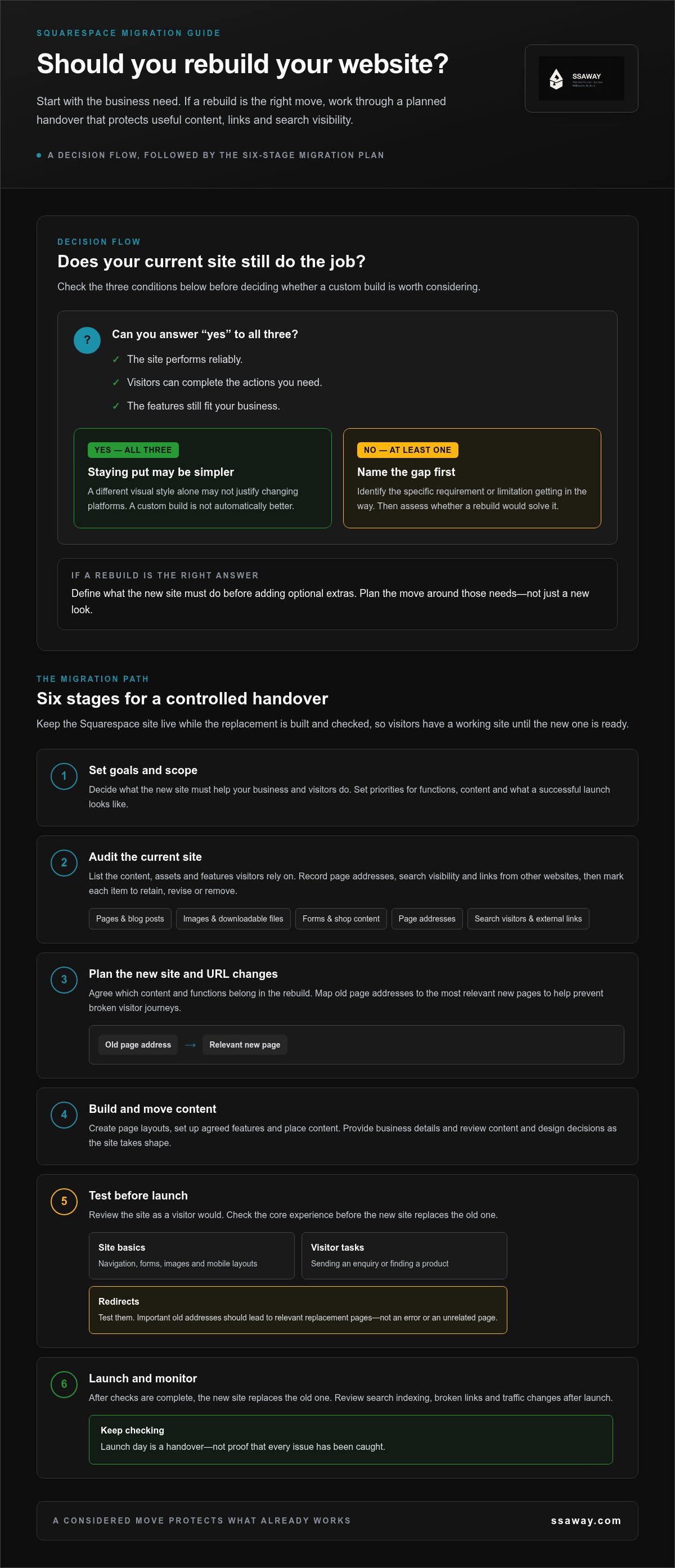
Consider a move when your current site can’t support a real business requirement or a specific limitation is getting in the way. You might need a different way to handle bookings, a shop function that better fits your products, or more control over how important pages are structured. Name the problem first, then assess whether a rebuild is the right answer.
If you’re weighing up “moving from squarespace to custom website”, focus on what your existing site can and can’t do. A different visual style, by itself, may not justify changing platforms. If your site performs reliably, visitors can complete the actions you need, and its features still fit the business, staying put may be simpler. A custom build is not automatically better. The case for it is strongest when it closes a clear gap.
Before deciding, write down what the current site does well, what it can’t do and what the new site must improve. That short list gives the migration a purpose and helps prevent extra features or design changes from expanding the project without solving a genuine need.
Moving from Squarespace to a custom website: step by step
A safe move is planned in stages. A clear sequence makes “moving from squarespace to custom website” more manageable, but the technical work depends on your site, its features and the project scope. Keep your Squarespace site live while the replacement is being built and checked, so visitors have a working site until the new one is ready.
- Set goals and scope. Decide what the new site must help your business and visitors do. Set priorities for functions, content and what a successful launch looks like.
- Audit the current site. List pages, blog posts, images, downloadable files, forms and shop content. Record page addresses, pages that bring in search visitors and links from other websites. Mark each item to retain, revise or remove.
- Plan the new site and URL changes. Agree which content and functions belong in the rebuild. Map old page addresses to the most relevant new pages. This gives the build a clear brief and helps prevent broken visitor journeys.
- Build and move content. The work may include creating page layouts, setting up agreed features and placing content. Provide business details and review content and design decisions as the site takes shape.
- Test before launch. Check navigation, forms, images, mobile layouts and key visitor tasks, such as sending an enquiry or finding a product. Test redirects too. Important old addresses should lead to relevant replacement pages, not an error or an unrelated page.
- Launch and monitor. Once checks are complete, the new site replaces the old one. After launch, review search indexing, broken links and traffic changes. Keep checking: launch day is a handover, not proof that every issue has been caught.
What should you audit before the rebuild begins?
Start with a practical inventory, not a technical checklist. Include every type of content and feature visitors rely on. Note which pages appear in search results and which receive links from other websites. Prioritise the material that needs to be preserved, and keep the inventory as a working record during the rebuild.
How should the new site be tested and launched?
Review the site as a visitor would. Try it on a mobile screen, submit each form and follow the main paths through the site. Semrush’s complete website migration checklist offers additional prompts for organising the move. Agree what will be tested before launch and who will review it.
For a project shaped around your business requirements, explore SSAWAY’s custom web development.
Will moving from Squarespace to a custom website hurt your SEO?
Moving from Squarespace to a custom website doesn’t guarantee a ranking drop or a ranking boost. Search visibility depends in part on keeping useful content and page information available, and handling changed addresses clearly. A redesign alone won’t make pages rank better. Missing content, broken links or redirects to irrelevant destinations can create problems for visitors and search engines.
A migration changes more than a site’s appearance. As Mailchimp explains what website migration is, it involves moving a site while managing its content and technical setup. For SEO, identify what already helps people find and use your pages, then preserve, review or remap it deliberately.
| SEO element | What to do during the move |
|---|---|
| Page titles, descriptions and headings | Preserve and review. Record these for important pages, then check that each new page has accurate, relevant information. |
| Images and image text | Preserve or revise. Keep useful images and their descriptive alt text. Update text if the image or page context changes. |
| Existing content | Preserve or improve. Make sure valuable, indexable content isn’t accidentally left behind when pages are rebuilt or combined. |
| URLs and links | Remap. Record old addresses, internal links and incoming links. Use relevant redirects when an address changes, and update links within the new site. |
| Structured data and sitemap | Review and verify. Check what the old site uses and how the new site handles structured data and its sitemap. Don’t assume the setup transfers automatically. |
Relevant redirects and preserved page information help search engines follow a site change. Send an old address to the closest relevant replacement, rather than directing every retired page to the homepage. If an important page disappears without a useful destination, visitors may hit an error and search engines may need to reassess what remains available.
What should you monitor after launch?
Use Google Search Console to review indexing, sitemap processing and reported page issues. Check important old URLs and their redirect destinations. Look for crawl errors, broken links and changes in the organic landing pages that bring visitors to your site.
Search performance can fluctuate after a rebuild. Don’t assume every change is caused by the migration, or that launch means the work is finished. Check the evidence, investigate specific issues and monitor changes over time.
How to prepare your Squarespace content and choose the right migration scope
Before moving from Squarespace to a custom website, decide what deserves a place in the new site. A rebuild doesn’t have to reproduce every old page. A clear content plan focuses effort on what visitors need and what supports your business.
Sort each page into one of four groups:
- Keep: useful, accurate pages that still serve a clear purpose.
- Update: pages with valuable information that needs a refresh.
- Combine: overlapping pages that could become one clearer resource.
- Retire: outdated or unnecessary pages, with a plan for any address that needs redirecting.
Scope depends on the number of pages, the features in use and the state of the material. A small site with a few current service pages needs a different plan from a large site with a blog, shop content and several customer pathways. For a practical view of project fit, read this guide to affordable website design.
Which content and functions need to move?
Start with the content that helps people decide, act or get in touch. This often includes key service pages, useful articles, contact details and the steps visitors follow to make an enquiry. Retain what’s accurate, improve what’s unclear and leave out material that no longer supports the business.
Include shop products, booking steps or integrations only if your current website uses them and they’re needed in the new one. For an online shop, an e-commerce website package can help frame the functions your customers rely on.
How do you set a realistic migration brief?
Write down who the site needs to serve, what visitors should be able to do and which business problem the rebuild must solve. Put essential launch needs first. Optional improvements can wait, keeping the first release focused instead of turning every idea into a requirement.
Visual preferences matter, but decide the must-have functions first. For example, clarify whether visitors need to request a quote, book a service or buy products before settling page layouts and styling. This makes the design serve a purpose.
Finally, record where the content and site materials are held, who will provide or approve them, and who will review the finished pages. Clear access and review responsibilities reduce delays and avoid assumptions about ownership. Ready to plan a rebuild around your business needs? Explore custom website development with SSAWAY.
Moving from Squarespace to a custom website with SSAWAY
Moving from Squarespace to a custom website is easier to plan when the project starts with clear business needs, not assumptions about what a rebuild should include. SSAWAY provides website design, SEO optimisation and custom web development. These services can support a migration plan focused on the content you need to retain, the features your business relies on and the search details that need attention.
What does a clear migration project need from the outset?
Bring your content inventory, must-have functions and launch priorities into the project discussion. Note which pages should stay, which need updating, and which can be combined or retired. List the core actions visitors need to complete, such as sending an enquiry, booking or purchasing, if those apply to your current site.
That information helps define the scope. The agreed requirements guide the design and development, how content is handled and which checks are needed before launch. A clear scope helps everyone understand what the finished website needs to include.
Keep approval criteria practical and specific. Check that the agreed pages are present, required features work as intended and the website has been reviewed as a whole. Test enquiry forms and follow key visitor journeys rather than approving the site based on appearance alone. Raise any issues against the agreed requirements so the review has a clear basis.
What is the next step if you are ready to move?
Start by outlining what your Squarespace site currently does and what needs to change. Include priority content, the features visitors depend on and any concerns about preserving search visibility. You don’t need every technical answer. A useful brief explains the business problem and the outcome you need.
With SSAWAY, you review and approve the finished website before payment, and no upfront payment is required. That gives you the opportunity to assess the completed work against the agreed project requirements before paying.
Prepare your inventory, identify the essentials and keep your review focused on whether the finished site meets the brief. Explore website design and development with SSAWAY.
Plan your move with a clear next step
A successful rebuild is more than a fresh design. It’s a planned handover of the content, page addresses and functions your business depends on. Before moving from squarespace to custom website, define what needs to change, organise existing pages into keep, update, combine or retire, and map important old URLs to relevant new pages.
Protect search visibility by carrying forward useful page information and checking redirects, links and indexing after launch. Be clear about the goal too: a custom site makes sense when it addresses a real business need, not simply because you’d like a different look.
SSAWAY provides website design, SEO optimisation and custom web development to support a rebuild shaped around your requirements. The working arrangement is straightforward: you review and approve the finished website before payment, and no upfront payment is required.
Ready to outline what your current site does and what you’d like to improve? Explore website design and development with SSAWAY. A clear brief is a practical first step towards a more suitable website.
Frequently Asked Questions
Can you move a Squarespace website to a custom website without losing SEO?
Yes, a Squarespace rebuild can retain SEO value, but no migration can guarantee unchanged rankings. Before launch, record important URLs, page titles, descriptions, headings and useful content. Map each changed address to its closest relevant new page with a redirect, and check internal links. After launch, use Google Search Console to monitor indexing and page issues. Rankings may fluctuate, so investigate actual errors rather than assuming the rebuild itself caused them.
How do you move a website from Squarespace to a custom website?
Moving from Squarespace to a custom website starts with defining your goals and auditing current pages, content and features. Decide what to keep, update, combine or retire, then plan the new site structure and map changed URLs to relevant destinations. Build the new site and check its content and features before launch. Keep the current site available during preparation, then monitor redirects, indexing and broken links after the switch.
What happens to my Squarespace domain when I move my website?
Your domain name and website are separate parts of the move. You can keep the domain registration where it is and point it to the new site, or transfer the registration to another registrar. The right steps depend on how your domain is registered and managed. Keep the registration active, coordinate the domain settings with the new site’s launch, and check that the domain loads the replacement website correctly.
Do I need to keep my old Squarespace website during the migration?
Yes, keep the live Squarespace site available while the replacement is being prepared and tested. Visitors can continue using it, and you can refer to its content and existing page addresses during the rebuild. Switch over only when the new site has been reviewed and key features, links and redirects have been checked. Avoid cancelling the old site or related services until you’ve confirmed the new website is live and working as intended.
How long does it take to move from Squarespace to a custom website?
There’s no single timeframe that suits every migration. The scope depends on the number of pages, how much content needs manual handling, which features must be rebuilt and how much review and testing is needed. A small site with a few pages is a different project from a shop with many products or custom functions. Agree on the work and review steps before the build begins, rather than relying on a generic estimate.
Will my Squarespace blog posts and images transfer automatically?
Not always. Squarespace 7.1 doesn’t support the built-in XML export feature, so content may need to be moved manually or with a tool. Export options vary by Squarespace version, and images may need separate handling. Make an inventory of posts, images and other important material before the rebuild. Then check the new site page by page to confirm that content is present, images display properly and links still work.
Is a custom website better than Squarespace for a small business?
Not automatically. A custom website may be a better fit if your business needs specific layouts or functions that your current site can’t support. But if Squarespace performs reliably and its features meet your needs, staying may be simpler. Base the decision on practical requirements, such as how customers enquire, book or buy, rather than design preference alone. A rebuild should solve a clear business problem.
Can I review a custom website before paying SSAWAY?
Yes. With SSAWAY, you review and approve the finished website before payment, and no upfront payment is required. Use the review to check the agreed pages, confirm required features work and make sure the completed site meets the project brief. This gives you a clear approval point before payment. Set out your priorities at the start so you have a practical basis for reviewing the finished website.


