
A polished website can still leave potential customers unsure what to do next. Good looks matter, but effective web design for small businesses also needs to build trust and make the next step clear, especially on a phone.
Choosing what to include can feel like guesswork. Does your site need more pages, clearer contact details or a simpler way for customers to enquire? This practical 2026 checklist helps you focus on what visitors need, spot gaps before launch or a redesign, and check whether your website is easy to use.
We’ll cover clear navigation, useful content, mobile usability, accessibility and search basics, along with what to ask a web designer and what to check before approving the finished work. The goal is a website that’s more than polished: it’s clear, practical and ready to support your small business.
Key Takeaways
- Start with what customers need to understand and do, then choose website features that support that goal.
- Use this web design for small businesses checklist to review navigation, readable content, mobile use and easy-to-find contact options.
- Build trust with useful evidence, and treat search basics as ongoing work rather than a one-off design task.
- Before launch, test links, forms and mobile views, check spelling, then submit a real enquiry to confirm it reaches the right place.
- Match the website type to how customers browse and buy. Ask about deliverables, content, ownership and payment timing. SSAWAY lets clients review and approve the completed website before payment, with no upfront payment required.
Web design for small businesses: start with the customer and the goal
A useful website doesn’t need a long list of features. It needs a clear purpose. Before choosing pages or discussing design, decide who the site is for, what they need to know and what you want them to do next.
Customer-first web design helps the right visitor understand your offer and take a useful next step. That could mean sending an enquiry, booking a service or browsing products. A clear goal gives each design choice a job: page order, wording, images and calls to action should all help customers move towards it.
Start with three questions:
- Who is your main audience? Be specific about the customers you most want to reach.
- Where do you serve customers? State your service area if location affects who can use your service.
- What’s the main customer task? Choose the action that matters most instead of asking every visitor to do everything.
These decisions help you choose what information belongs up front. Customers may need to see what you offer, who it’s for and how to contact you. Your business history or detailed background can sit further down the page, or on a separate page, if it doesn’t help someone make an immediate decision. The areas of web design include how a site looks, works and supports its goals. Keep those parts connected to what customers need.
What should a small-business website help customers do?
Name one primary action, then make it easy to find. A service business might prioritise an enquiry; a retailer might guide visitors to browse products. Secondary details still matter, but they shouldn’t compete with the main task. Once the goal is clear, decide what belongs on the first page, what needs its own page and where each call to action should appear.
How to brief a web designer before work begins
A clear brief reduces guesswork. Tell the designer who you serve, what you offer, what makes your business different and which questions customers commonly ask. Include the main action you want visitors to take and any relevant service area.
Gather existing copy, suitable images and approved business details before design starts. Flag anything that needs updating and check that the information you provide is accurate. If you’re weighing up different website options, the affordable website design guide offers useful package context. A focused brief gives your designer a practical starting point and gives you a clear basis for reviewing the work.
Small-business website design checklist: make every page easy to use
A visitor shouldn’t have to work out what your business does or search for contact details. Check each page from the customer’s point of view: can they recognise the business, understand the offer and find the next step without hunting?
Use this quick review across your site:
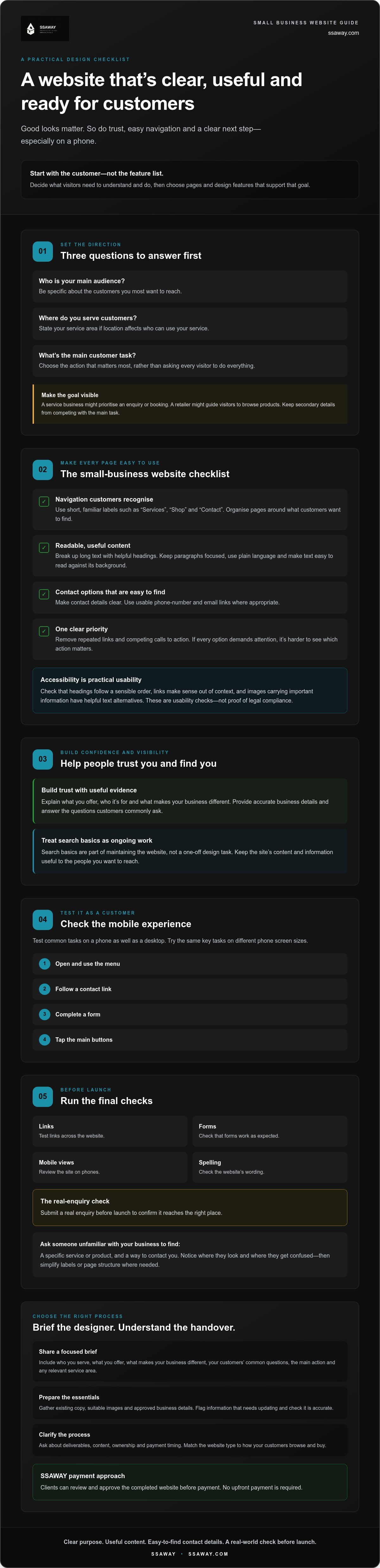
- Navigation: Use short, familiar labels such as “Services”, “Shop” and “Contact”. Organise pages around what customers want to find, not internal business terms.
- Readable content: Break up long blocks of text with useful headings. Keep paragraphs focused, use plain language and make sure text is easy to read against its background.
- Visible contact options: Put a clear contact link or button where visitors can find it. Make phone numbers and email addresses usable links where appropriate.
- Clear choices: Remove repeated links and competing calls to action. If every button demands attention, it’s harder to see which action matters.
Accessibility is part of practical usability, not an optional finishing touch. Check that headings follow a sensible order, links make sense out of context and images that carry important information have helpful text alternatives. The SBDCNet’s Website design best practices also highlights the value of understanding your audience. Treat these checks as ways to make the site easier for more people to use, not as proof of legal compliance.
Can visitors find key information without hunting?
Ask someone unfamiliar with your business to find a specific service, product and contact option. Watch where they look and listen for confusion. If they pause or choose the wrong link, simplify the label or page structure. Good web design for small businesses makes important information easy to spot without making every page compete for attention.
Does the website work well on mobile?
Test common tasks on a phone as well as a desktop. Open the menu, follow a contact link, complete a form and tap the main buttons on different phone screen sizes. Check that text stays readable, controls have room to tap and no important content forces horizontal scrolling. A page that looks tidy on a computer can still be awkward on a small screen.
Try the same checks yourself, then ask someone else to complete the key task without help. If you’re comparing options for a new site, you can view SSAWAY’s website options as one place to start.
Small-business website design checklist: build trust and help people find you
A polished colour scheme can make a site look professional, but it can’t answer the questions customers bring with them. They want to know what you do, whether you’re a good fit and how to get in touch. Clear information and credible proof work together to build trust. Decoration has a place, but it shouldn’t take the place of useful details.
Which trust signals belong on a small-business website?
Use evidence that’s genuine and relevant. Add customer testimonials only with permission, and include qualifications or accreditations only when they apply. Describe your services accurately. Keep your business name and contact details consistent across important pages so visitors know they’ve reached the right business.
Be selective with images and claims. Don’t present stock imagery as examples of your own work, make promises you can’t support or leave old details in place. A dated testimonial or incorrect contact number can undermine confidence. Forbes’ guide to web design best practices also discusses choices that help a small-business site feel usable and credible.
What are the basic SEO checks for a new website?
Start with clear, accurate information. Give each important page a descriptive title that tells people what it covers. Use meaningful headings to organise the content, and describe each service in plain language your customers would recognise. Make sure key pages are reachable through the site’s navigation and that link labels explain where they lead.
These checks help people and search engines understand your site, but they can’t guarantee rankings. SEO isn’t a switch you turn on once during design. Keep business details current and review pages as your services change. For related planning context, see the Australian website design cost guide.
- Check the proof: Is each testimonial, qualification and claim accurate?
- Check the details: Do your business name and contact methods match across key pages?
- Check the page basics: Does each important page have a useful title, clear headings and descriptive service information?
- Check the route: Can visitors reach important pages through straightforward navigation?
For web design for small businesses, trust and findability should support each other. If you’re considering a new site, explore SSAWAY’s website options, including one-page, shopfront and e-commerce packages, to see what may fit your needs.
Before launch: test the small-business website from a customer’s point of view
A website can look finished and still frustrate customers. Before approving the work, use it as they would: find key information, complete the main task and check that the result is what you expect. This final review is a practical part of web design for small businesses. It can catch problems before customers encounter them.
What should you test before approving a website?
Work through the site on a phone and a desktop screen. Don’t just look at the homepage. Follow the route a customer might take, from landing on a page to making contact or browsing products.
- Open every key page. Use the navigation and check that each link leads to the right place.
- Test buttons and contact links. Try phone, email and social links, where included.
- Submit a real enquiry. Check that the form accepts the information, confirms submission and sends the enquiry to the expected destination. Confirm who receives it and how you’ll know it arrived.
- Review phone and desktop layouts. Check long headings, form fields and buttons. Make sure content is visible and usable without awkward scrolling or cut-off text.
- Proofread and verify details. Check spelling, business information, image permissions and links to external platforms.
Ask someone unfamiliar with the project to complete a key customer task without your help. Their hesitation can reveal a confusing label or missing instruction that you’ve stopped noticing.
What should you clarify about website access and handover?
Before sign-off, ask who controls the domain, hosting account and website administrator access. Find out how routine content updates are made and where access details will be stored securely. If support, maintenance or future changes have been discussed, get the agreed arrangements in writing. Don’t assume they’re included unless the scope confirms it.
Review the complete site and confirm it meets the agreed requirements before approving it. SSAWAY’s process lets clients review and approve the completed website before payment, with no upfront payment required. If a simpler structure may suit your content and customer tasks, read the one-page website guide for Aussie small businesses.
Ready to compare website options? Explore SSAWAY’s website packages and consider which scope fits how your customers browse and buy.
Choose a web design process that fits your small business
The right website scope depends on how customers need to use your site. A focused business with one main offer may not need the same structure as a retailer with a large product range. In web design for small businesses, choose the format around the customer journey, not the longest feature list.
Which website format could fit your business?
- One-page website: Consider this when your key information and main customer action are focused. A visitor can learn what you offer and find the next step in one place.
- Shopfront website: This can suit a business that needs to present its services or products clearly across dedicated pages, helping customers explore what’s available.
- E-commerce website: Choose this when customers need to browse products and purchase online through your website.
These are starting points, not automatic answers. Think about what customers need to compare, understand or complete. If you’re unsure, ask a designer to explain how the proposed structure supports those tasks and what it would mean to add or change pages later.
What should you ask before choosing a web designer?
Get the scope and process in plain language before work begins. A polished mock-up is only one part of the decision. You also need to know what you’ll receive, what you’ll be asked to provide and how approval works.
- Deliverables: What pages and features are included, and what isn’t? Who supplies the copy, images and other content?
- Revisions: At what stages can you review the work, and how are requested changes handled?
- Ownership and access: Who controls the domain and website accounts? What access and handover information will you receive?
- Payment timing: Is payment due upfront, at agreed stages or after you’ve reviewed the completed website?
- After launch: Is any support or maintenance included? If not, what arrangements apply to future changes?
Write down the answers and check they match the agreement. A clear process helps you know what to expect and what you’re responsible for.
SSAWAY offers one-page, shopfront and e-commerce website packages, as well as custom web development. Its process lets clients review and approve the completed website before payment, with no upfront payment required. That may suit businesses that value seeing the finished work before paying, though the right process depends on your project and preferences.
Explore SSAWAY website design options to compare the available website formats and decide what could fit your business.
Make your next website decision with confidence
Good web design for small businesses starts with a clear customer goal, then backs it up with pages that are easy to use, trustworthy information and a practical pre-launch check. Choose a website format that fits how people browse and buy, and get the scope, responsibilities and payment timing clear before work begins.
If you’re weighing up your options, SSAWAY offers one-page, shopfront and e-commerce website packages, as well as custom web development. There’s no upfront payment required, and you can review and approve the completed website before payment.
Explore SSAWAY website design options to see which format may suit your business. Start with what your customers need, take the checklist one step at a time, and build a website you can feel confident sharing.
Frequently Asked Questions
What should a small-business website include?
A small-business website should explain what the business offers, help visitors find important information and make the next step obvious. That next step might be enquiring, booking, viewing services or products, or purchasing through an online shop. Include accurate contact details and genuine trust signals, such as relevant testimonials. Check that key content and actions are easy to use on mobile. Choose features based on what your customers need, not a generic checklist.
How do I know if my small-business website design is working?
Check whether visitors can complete the main task your website is meant to support. Try the journey yourself on a phone and desktop, then use suitable measurement tools to review enquiries, form submissions, calls or online orders. Look for broken links, confusing pages and questions customers keep asking. Good web design for small businesses isn’t measured by appearance alone. Usability and meaningful outcomes help show whether the site is doing its job.
Is a one-page website enough for a small business?
A one-page website can be enough if your offer is focused and visitors can find essential information and a clear next step in one well-organised place. If you have several services, detailed product information or different customer journeys, separate pages may make the content easier to explore. Decide based on what customers need to understand and do. There’s no rule that every business needs the same number of pages.
How important is mobile-friendly web design for small businesses?
Mobile usability matters because customers may use a phone to check business details, compare services or get in touch. Test your actual pages on a phone, not just in a desktop preview. Check that navigation is easy to operate, text is readable, buttons have room to tap and forms are straightforward to complete. Essential information and actions should be just as easy to find on a small screen as on a computer.
What should I check before approving a new business website?
Test the main customer journey from beginning to end. Open key pages, follow navigation, submit forms and try contact links on mobile and desktop. Check that business details, spelling, images and service descriptions are accurate. Also clarify who controls the domain and website access, how routine updates are made, and what support or future changes have been agreed. Review the finished site against the agreed requirements before approving it.
Can I review a website before paying a web designer?
Yes, if the provider’s process allows it, but confirm the approval and payment terms before work starts. Ask what counts as a completed website, how you’ll review it, what changes are included and when payment is due. SSAWAY allows clients to review and approve the completed website before payment, with no upfront payment required. Check that any provider’s process is clearly explained and recorded before you agree to proceed.


