
What if the limits you’re worried about aren’t stopping growth at all? Squarespace can support a growing business, but workarounds may become harder to manage as sales channels, teams and daily processes expand. If you’re researching squarespace limitations for growing business, the key question isn’t whether limits exist. It’s whether they affect the way your business needs to work.
It’s fair to hesitate before changing platforms. Extra tools can add complexity, while a rebuild may bring concerns about cost, disruption and losing useful website content. Some constraints may be resolved with a plan change or a practical adjustment. Not every growing business needs to migrate.
This article will help you distinguish real blockers from manageable inconveniences. You’ll learn how to test whether Squarespace can support your next stage, when an improvement or extension may be enough, and when a new website or custom development could make more sense. You’ll also find practical ways to plan a transition and protect business continuity and valuable content.
Key Takeaways
- Growth alone doesn’t mean your website is holding you back. Compare platform capabilities with specific business requirements before deciding.
- Use the squarespace limitations for growing business checklist to identify where customisation, integrations or online sales workflows need testing.
- Compare staying, simplifying and rebuilding against the same priorities, including how often a workaround is needed and what it costs your business in time and risk.
- Audit essential website tasks before approving a redesign or platform change, and plan how to protect important content and business continuity.
- If a new website or custom development is the right next step, SSAWAY projects require no upfront payment. You review and approve the finished website before payment.
Squarespace limitations for a growing business: when do they matter?
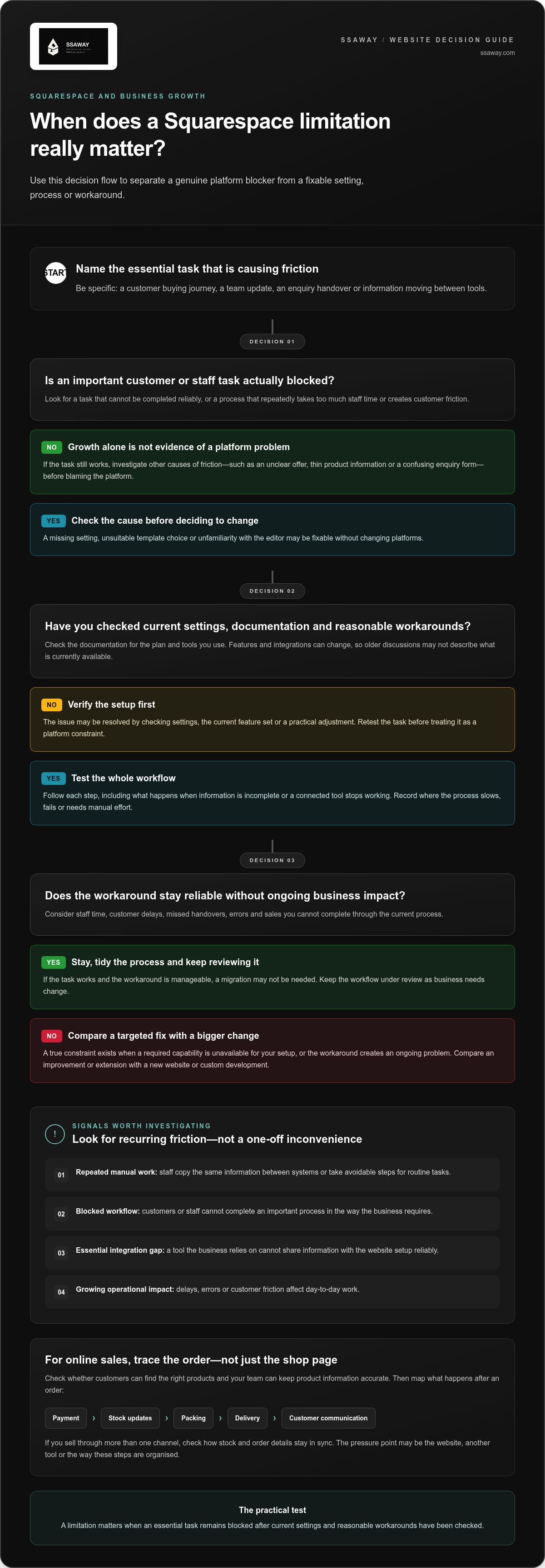
A platform limitation matters when your business needs to complete an essential task and the available tools can’t do it reliably, even after you’ve checked the settings and reasonable workarounds. That’s the practical test behind squarespace limitations for growing business: the question isn’t whether your business is bigger, but whether the website still supports the way it needs to operate.
Growth alone isn’t proof that Squarespace is holding you back. More visitors, products or enquiries may simply mean your business is changing. The platform becomes a concern when a specific requirement repeatedly runs into a hard constraint, takes too much staff time or can’t be handled in a way that works for your customers.
What does a Squarespace limitation mean for a business?
Start with everyday tasks. Can customers complete the buying journey you need? Can your team update important information without relying on a fragile process? Do enquiry details reach the right person or system? If the answer is no, identify the cause before blaming the platform.
A missing setting, unsuitable template choice or unfamiliarity with the editor may be fixable without changing platforms. A true platform constraint is different: a capability your business requires isn’t available for your setup, or the workaround creates an ongoing problem. Squarespace has changed over time as a website-building platform. The Squarespace Wikipedia overview offers background, but it isn’t a guide to current features. Check Squarespace’s current documentation for the plan and tools you use before drawing conclusions.
Also separate platform capability from website performance. An outdated design, unclear offer, thin product information or confusing enquiry form can weaken results on any platform. Falling enquiries are a reason to investigate, not proof that Squarespace caused the drop. Review your content, customer journey and marketing changes alongside your website setup.
Which growth signals deserve a closer look?
Look for recurring friction rather than a one-off inconvenience. For each issue, record the task, how often it happens, who handles it and its impact on the business. Include time spent on manual steps, customer delays, missed handovers or sales you can’t complete through the current process. This evidence helps distinguish a genuine platform mismatch from a process that simply needs tidying up.
Investigate alternatives when an essential task remains blocked after you’ve checked current settings and documentation. Common signals include:
- Repeated manual work: Staff regularly copy the same information between systems or take avoidable steps to complete a routine task.
- A blocked workflow: Customers or staff can’t complete an important process in the way the business requires.
- An essential integration gap: A tool the business relies on can’t share information with the website setup reliably.
- Growing operational impact: A workaround causes delays, errors or customer friction often enough to affect day-to-day work.
Don’t jump from frustration straight to a rebuild. Document the requirement and the cost of the current workaround first. That gives you a clear basis for comparing targeted adjustments with bigger changes.
Where Squarespace may constrain customisation, integrations and online sales
A business can often grow on Squarespace without changing platforms. The useful question is whether the website supports the tasks your next stage depends on, using built-in tools or connections to other software. A feature that exists but makes an important process unreliable or labour-intensive can still cause a real problem. The squarespace limitations for growing business worth investigating are the ones that affect customers, staff time or sales.
When custom functionality or integrations become a sticking point
Start with the workflow, not a technical feature list. Perhaps customers need to submit specific information before an enquiry reaches your team, or a sale needs to pass details into business software. Write down each step and note where the process slows down. Then check current Squarespace documentation for your plan and setup. Features and integrations can change, so an old forum post may not describe what’s available now.
Next, assess the workaround. Does someone re-enter information by hand? Could a missed update lead to an incorrect order or delayed response? Occasional manual work may be manageable; repeated effort in an essential process deserves closer attention. Test the whole workflow, including what happens when information is incomplete or a connected tool stops working. Don’t treat a need for custom functionality as proof of platform failure before checking the current options.
When e-commerce needs become more demanding
A larger product range doesn’t automatically mean your shop has outgrown its platform. Check whether customers can find the right items and whether your team can keep product information accurate. Then map what happens after an order, including payment, stock updates, packing, delivery and customer communication. The pressure point may be the website, another tool or the way these steps are organised.
Review your sales channels too. If you sell through more than one channel, consider how stock and order details stay in sync. Record duplicate entry, delays or errors, then verify whether Squarespace’s current features or integrations address the specific need. For a practical way to assess the shape and scope of an online shop, see this guide to e-commerce website packages.
How to assess SEO and content-management needs
Check how your team publishes and updates content. Can staff organise pages in a way that makes sense to visitors? Can they manage the search settings they rely on for important pages? Confirm current options in Squarespace documentation, then review actual search performance before blaming the platform. Weak rankings can also relate to page relevance, content quality, competition or technical setup.
Make the assessment concrete: list the pages that matter, the updates they need and any recurring publishing delays. If you’re considering how your site should support the business more broadly, this guide to affordable website design can help frame that planning.
If your audit identifies a genuine gap, compare a targeted improvement with a broader rebuild. SSAWAY’s website packages and custom development can be assessed against the requirements you’ve documented, without treating a platform change as the automatic answer.
Stay on Squarespace or move on? Compare the real trade-offs
Business growth doesn’t automatically mean it’s time to leave Squarespace. A platform change brings work of its own, so compare each option against the requirements your business depends on. The right choice might be to keep the current site, simplify how it works or rebuild. The goal is to solve a clear business problem, not to change platforms for its own sake.
When staying and improving the current site makes sense
If core tasks work and the friction is limited, improve what you have first. Better navigation, clearer page structure, stronger content or a simpler enquiry path may address the problem without changing platforms. Check current settings and documentation before assuming a feature is unavailable. A new platform won’t replace a clear offer or a sound plan for reaching customers.
When workarounds stop being practical
Review workarounds when staff repeat manual steps, a connection between tools is fragile, or a routine task regularly stalls. Separate a genuine business need from a preference: which functions affect customers, sales or essential operations? Then compare the ongoing staff effort and risk of the workaround with the value of fixing the requirement. That gives the decision a firmer basis than frustration alone.
Use the same criteria for all three options. Platform capabilities change, so check any specific comparison against current documentation and your verified requirements.
| Option | Fit and workarounds | Staff effort and risk | Future flexibility |
|---|---|---|---|
| Stay | Core needs are met; workarounds are minor. | Existing effort and risk remain manageable. | Depends on whether upcoming needs fit the current setup. |
| Simplify | Issues relate to structure, content or process rather than a confirmed platform constraint. | Focused changes may reduce unnecessary work. | Can make the current setup easier to manage, but won’t resolve every capability gap. |
| Rebuild or change platform | Documented essential requirements can’t reasonably be met by the existing setup. | Requires planning for content, training and continuity; may address a recurring bottleneck. | Assess against likely needs rather than assuming flexibility is unlimited. |
When a rebuild or platform change deserves consideration
Consider a rebuild when you can identify an important requirement the current setup can’t reasonably meet and simpler changes won’t address it. Factor in content migration, staff training and how the business will keep operating during the change. A website redesign guide can help you plan the wider project. The practical squarespace limitations for growing business decisions should be based on fit, effort and risk, not growth alone.
If your assessment points towards a new site or tailored development, explore website packages and custom development as options to weigh against your documented needs.
How to test Squarespace limits before changing your website
Before approving a redesign or platform change, turn your concerns into a short, evidence-based audit. The phrase squarespace limitations for growing business can sound like a platform verdict, but it shouldn’t be. Identify which tasks matter, where the current setup creates friction and whether a change would solve a verified problem. Check current Squarespace documentation for capabilities you’re unsure about, then assess them against your own setup and business needs.
Build a requirements list from real business tasks
Start with the task, not a preferred technical fix. Describe what a customer, staff member or sales process needs to achieve, then record where the current website gets in the way. Rank each requirement as essential, useful or optional for your next stage. This prevents a long wish list from driving a costly change when only one workflow needs attention.
- Task: What is the person trying to do?
- Friction: Where does the process slow down or stop?
- Outcome: What needs to happen instead?
- Priority: Is this essential, useful or optional?
Test the cost and risk of each workaround
For each recurring issue, note how often it occurs and track what you can measure, such as staff time, duplicate data entry, errors or customer delays. Describe the impact without guessing at a dollar value. Compare the effort involved in maintaining the workaround with the likely value of resolving the issue. Mark uncertain features or integrations for verification in current documentation before treating them as platform limits.
Look for patterns. Extra effort on one occasion may be tolerable; the same friction repeated across a core process may deserve attention. Keep observations separate from assumptions, and record how you tested the workflow. This makes your decision more reliable than one based on a single frustrating experience.
Plan a change without losing business continuity
If a change is justified, inventory the website before planning the work. List important pages, useful content, forms, connected tools and the customer journeys that bring people from discovery to enquiry or purchase. Identify which pages need to remain available and map old page addresses to relevant new ones where possible. Plan redirects and search visibility carefully, while recognising that no migration can promise unchanged rankings.
Make the project scope reflect what the audit found, not a vague brief to “make the site bigger”. A clear list of requirements helps you compare options, effort and continuity risks. For broader planning, this guide to Australian website design costs explains factors that shape a project’s scope.
If your audit points to a new website or custom development, plan your website project with SSAWAY. Projects require no upfront payment, and you review and approve the finished website before payment.
Choose a website solution that fits your next stage of growth
Your audit should point to a practical next step, not an automatic migration. If your current site handles essential tasks, keeping it may be the simplest fit. If the friction comes from confusing navigation, dated content or an awkward customer journey, improving the existing setup may be enough. Consider replacing it only when documented requirements can’t reasonably be met by keeping or refining what you have.
That’s the clearest way to act on the squarespace limitations for growing business you’ve identified: choose based on what your website needs to do, not the assumption that a growing business must have a bigger or more complex platform.
Match the website approach to the job it needs to do
Start with the core purpose. A one-page website package may suit a business that needs a focused online presence, while a shopfront website package can help present services or offerings clearly. Neither choice depends on using a particular platform. It depends on the pages, content and customer actions the project needs to support.
If online selling is central, an e-commerce website package is designed around that requirement. If your documented needs call for a tailored build beyond a standard package, custom web development may be the more suitable route. Keep the scope tied to real tasks. Extra features aren’t automatically useful if they don’t solve a business problem.
Make the next step clear and low-pressure
Before choosing a build, write down the problem, the outcome you need and what the project must include. For example, identify which customer journey needs to work better, what information staff need to manage and which existing pages or content are important to keep. A clear brief makes it easier to decide whether to retain, improve or replace your current setup.
SSAWAY provides one-page, shopfront and e-commerce website packages, as well as custom web development. Projects require no upfront payment. You review and approve the finished website before payment, giving you a chance to assess the completed work before paying. That approval step gives you a clear point to check whether the agreed project meets its stated purpose.
When you’re ready to discuss a website project based on your documented needs, explore SSAWAY website solutions. Start with the job your site needs to do, then choose the simplest approach that can support it.
Make your next website decision with confidence
Your next step doesn’t need to be a complete rebuild. Choose one business requirement that matters, decide what a better outcome looks like, and use that as the starting point for any website changes. This keeps the focus on solving a real problem rather than chasing features you may not need.
The squarespace limitations for growing business question is best answered with your own evidence: what your website needs to do, and whether your current setup can do it reliably. If it can, keep improving it. If it can’t, a new website or tailored development can be scoped around the gap. SSAWAY website packages and custom development are priced under A$1,000, giving you a clear project option to consider.
Explore straightforward website solutions with SSAWAY when you’re ready to plan a next step around your business needs. Start with the problem you want your website to solve, then move forward from there.
Frequently Asked Questions
Is Squarespace suitable for a growing business?
Yes, Squarespace can suit a growing business if its current tools support the work the business needs to do. A consultancy adding staff, for example, may need clearer service pages and an easier way to update team information, not a new platform. Review the tasks behind the growth, then check whether your current setup can handle them. Reassess as your products, sales processes or customer needs change.
What are the main limitations of Squarespace for businesses?
Potential limitations usually relate to how a business needs to customise its website, connect tools or manage online sales. The specific squarespace limitations for growing business owners should investigate depend on their setup and requirements, not a universal checklist. For instance, a team may need information to move between its website and another system. Check current Squarespace documentation and test your own workflow before treating a difficulty as a fixed platform limit.
Can I migrate my Squarespace website to another platform?
Yes, moving a website to another platform may be possible, but don’t assume every part will transfer in the same way. Pages, images, products, forms, design and connected tools can need different handling. Before starting, list what must be retained, note important page addresses and check current Squarespace guidance on exporting content. Test the new site before switching over, and plan for content or functions that need to be recreated.
Does Squarespace limit SEO for a growing business?
Squarespace provides foundational SEO settings, but a low ranking doesn’t by itself show that the platform is the cause. Check whether important pages have distinct, useful content, clear titles and descriptions, and links that help visitors find related information. Review search data for individual pages and relevant queries rather than judging the whole site from one result. If a specific search setting is essential, verify its availability in current Squarespace documentation.
When should a business move away from Squarespace?
Consider moving when an important business requirement remains unmet after you’ve checked the current settings, plan and documented options. A useful trigger is a recurring problem with a real operational effect, such as staff maintaining duplicate records to complete a customer order. Before committing, compare the expected benefit with the work of rebuilding, moving content, retraining staff and checking key customer journeys on the replacement site.
Is a Squarespace rebuild worth it for a small business?
It can be, if the rebuild solves a clearly defined problem and the expected benefit justifies the effort. First decide whether you mean improving the site while keeping Squarespace or moving to a different platform. A small business with confusing service pages may need a content and navigation refresh; one with a core workflow the setup can’t support may need a broader change. Set success measures before work begins, such as easier updates or a clearer path to enquiry.


