
What if the feature that makes your website look impressive is the very thing making it harder to use? A polished design can still leave customers unsure what you offer, where to click or how to take the next step. If you’re searching for professional web design, or planning a website anywhere in Australia, the key question is the same: can customers quickly understand your website and act with confidence?
It’s reasonable to want a site that looks professional. But looks alone won’t answer customer questions or make a page easy to use on a phone. The useful choices are often simpler: clear wording, easy navigation, mobile-friendly pages and a visible next step.
This roundup will help you recognise the design features that support clarity and usability, review an existing site or plan a new one. We’ll look at what customers need to find, how mobile use and search visibility fit into the picture, and how a clear project scope can make decisions easier. No design jargon. Just practical ways to make your website more useful to the people who visit it.
Key Takeaways
- Shape your website around what customers need to understand, trust and do next, not around a long list of design trends.
- Use clear navigation and focused page content to help visitors find services, products and contact details without hunting.
- Check common tasks on mobile and desktop, then review text readability, contrast, keyboard access and working forms.
- Use a simple review process to set your website goals, choose the right pages and prioritise the actions that matter most.
- When comparing Australian web design options, consider the project scope and website format, then look for a process that lets you review the finished site before payment.
What makes a small-business website useful to its customers?
A useful website helps visitors understand what a business does, trust the information and take a sensible next step. Someone looking for a particular product or service shouldn’t have to guess whether you offer it, who it’s for or how to make an enquiry. Effective web design is not just about a sharp-looking page. It makes those answers easy to find.
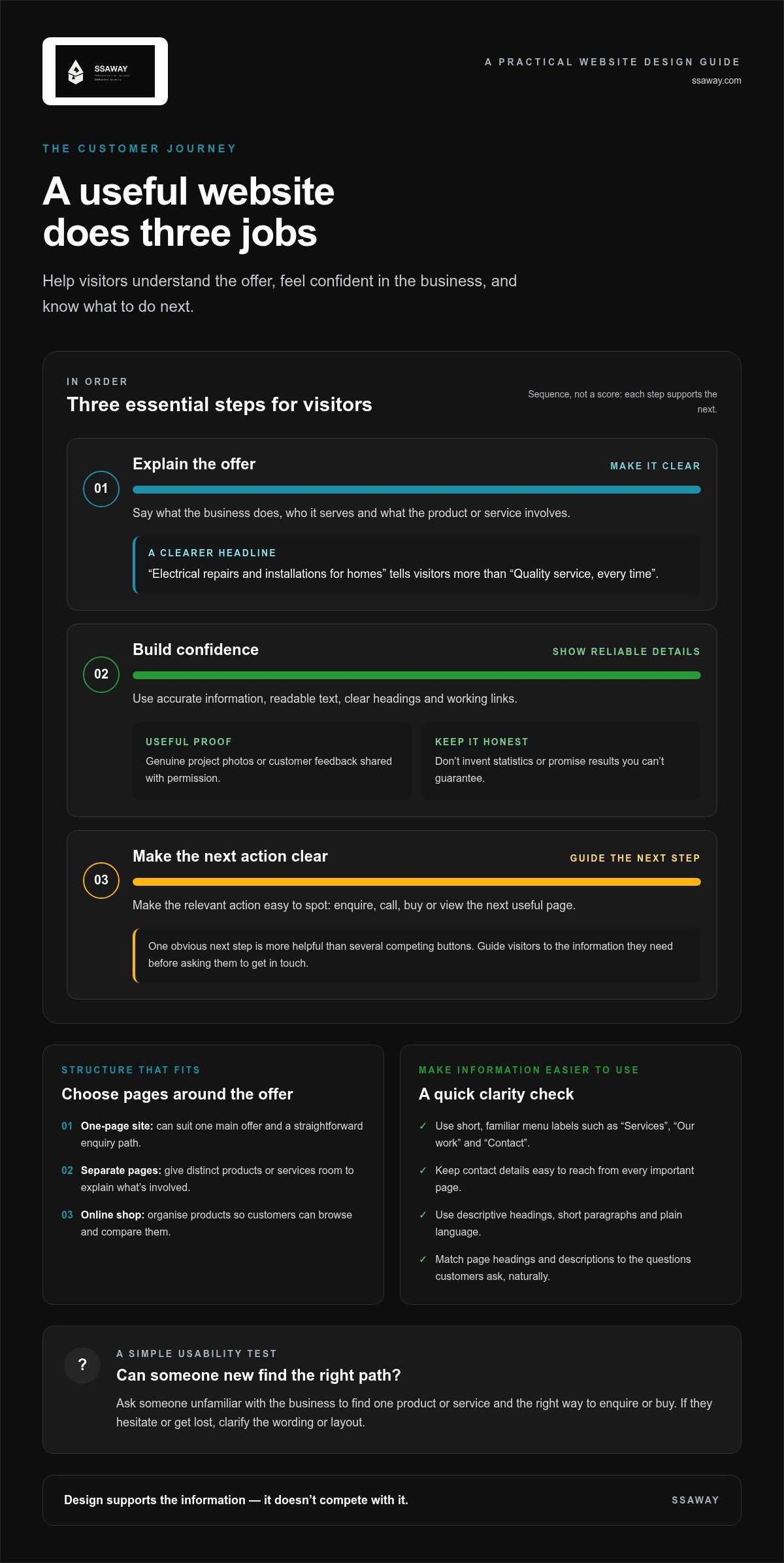
A small-business website has three jobs: explain the offer, build confidence and make the next action clear. Think of the visit as a short journey. A customer arrives on a page, checks that the offer matches their need, looks for reasons to trust the business, then calls, sends an enquiry or views the next useful page. If any step is unclear, they may leave without acting.
Visual design still matters. A considered layout, suitable colours and good-quality photos can make a business feel professional. But appearance can’t make up for vague wording, hard-to-find contact details or a page that’s awkward to use. The principles of web design cover more than appearance; usability and accessibility are part of making a site work for its audience.
What should a visitor understand straight away?
Start with the first screen a visitor sees. A clear headline should identify the business, the people it serves and the main offer. For example, “Electrical repairs and installations for homes” tells a visitor more than “Quality service, every time”. The first is specific. The second could describe almost any business.
Use plain language to explain each product or service. Say what it involves and who it’s for. Avoid broad claims such as “industry-leading solutions” unless you can explain exactly what they mean. Visitors need useful details, not slogans they have to decode.
Give the main action a clear label and a visible place. If you want enquiries, make the contact option easy to spot. If visitors need to choose a product or service first, guide them to that information before asking them to get in touch. One obvious next step is more helpful than several competing buttons.
How does a website build trust without overclaiming?
Trust comes from details that are accurate and consistent. Describe the products and services you actually provide, keep business contact details up to date, and use genuine proof where it’s available, such as real project photos or customer feedback shared with permission. Don’t invent statistics, promise results you can’t guarantee or call the business “the best” without evidence.
Presentation sends a signal too. Readable text, clear headings and working links show care. A broken contact link or a cramped page makes it harder for people to act and can leave them questioning whether the information is current.
Try a simple check: ask someone unfamiliar with the business to find one product or service and the right way to enquire or buy. If they hesitate or get lost, clarify the wording or layout. Useful design isn’t decoration alone. It’s a practical path from a customer’s question to a confident next step.
Which website design elements make information easier to use?
Organise a website around what visitors come to do, not around a catalogue of design trends. A customer might want to check whether a product or service is available, see examples, understand the next step or find contact details. Give each task a clear route through the site. Use design to support the information, not compete with it.
Page content also helps search engines understand what a page is about. Match headings and descriptions to the questions customers actually ask, using natural language rather than repeating keywords. A page that clearly explains an offer is more useful to people, but no layout or phrase can guarantee a particular search position. For broader context on practical choices, see this 2026 Australian web design guide.
How should pages and navigation be organised?
Keep the main menu short and label links with familiar, descriptive words. “Services”, “Our work” and “Contact” tell visitors what they’ll find; clever labels can slow them down. Match the page structure to the size of the offer. A focused one-page site may suit a business with one main offer and a straightforward enquiry path. If customers need to compare several products or services, separate pages can give each one room to explain what’s involved.
- Use menu labels customers recognise, not internal industry terms.
- Give each major product or service its own page if visitors need distinct details to choose between them.
- Keep contact details easy to reach from every important page.
For a business with several service types, a visitor should be able to choose the relevant one without scrolling through unrelated details. For a simpler offer, a clear one-page layout can keep the key information together. For an online shop, organise products so customers can browse and compare them. The right structure is the one that makes the next step obvious.
What content helps visitors decide what to do next?
Bring related information together. A service page might explain the work, who it suits, what a customer should do next and provide relevant evidence, such as genuine project photos or customer feedback. Use descriptive headings so people can scan for the answer they need. Keep paragraphs short, and explain industry terms if customers may not know them.
Make the next step fit the page. After describing a service, show how to enquire about it. On a product page, make the purchase action clear. Avoid vague buttons such as “Learn more” when a clearer label like “Request a quote” better describes the action. Keep the wording accurate and the action consistent across the site.
Good structure also makes information easier to read and use. The W3C’s Web Content Accessibility Guidelines (WCAG) explain accessibility principles that can inform choices such as clear headings and understandable content. For more practical layout inspiration, explore this small-business website design ideas roundup.
Planning a site around customer tasks can help you define its scope before design begins. Explore website design options if you’re ready to turn that plan into a clear website structure.
How do mobile usability, accessibility and search work together?
A customer might find a website through search on a phone, then try to check a product or service or send an enquiry while on the move. If the text is hard to read or the form is fiddly, that journey breaks down. A canberra web design search, like any search for a web design service, points to the same practical considerations: mobile use, accessibility and search should work together to help people find the right page, understand it and use it.
Accessible, mobile-friendly design makes it easier for more customers to find information and take the next step.
Compare common tasks across screen sizes:
| Visitor task | Desktop check | Mobile check |
|---|---|---|
| Find a service | Is the service easy to locate in the menu? | Can it be found without awkward scrolling or tiny menu controls? |
| Read key details | Are headings and paragraphs clear on the page? | Is text readable without zooming or sideways scrolling? |
| Make an enquiry | Are the form and contact options easy to use? | Can buttons be tapped comfortably, and can the form be completed on a small screen? |
What does a mobile-friendly experience look like?
Start with the actual tasks customers need to complete. Check that service details remain readable, buttons are easy to tap and forms don’t require unnecessary effort. Test the whole journey on a phone, from finding a service to submitting an enquiry or completing a purchase. A page that merely shrinks to fit isn’t necessarily easy to use.
Image files can be compressed to reduce their size, while focused page layouts help avoid loading unnecessary content. Both choices can support efficient loading, though results depend on the site and how it’s built.
How can accessibility and search visibility support each other?
Use headings that describe the content below them and link text that makes sense on its own. For informative images, write alternative text that conveys their relevant purpose; decorative images don’t need descriptions that add noise. Clear labels and sensible form instructions also help visitors understand what to do.
The W3C’s Web Content Accessibility Guidelines (WCAG) offer a reference for thinking about accessible content and design. Referencing WCAG doesn’t, by itself, prove a site meets a particular standard. It’s a practical guide for considering needs such as readable content and keyboard access.
Clear page structure helps visitors scan information and gives search engines useful clues about the page’s subject. That doesn’t guarantee a ranking. Page speed and Core Web Vitals are performance signals, not ranking shortcuts. Check that pages load efficiently, then focus on useful content and a smooth journey. Accessibility, mobile usability and search work best when they support the same goal: getting the right information to people without unnecessary friction.
How can you review a website design before committing?
Review the plan before approving the build, then test the finished design as a customer would. A short, written scope can prevent a polished site from missing a practical requirement, such as a clear service page or a form that works on a phone. If you’re comparing canberra web design options or web design services elsewhere in Australia, use the same checks for each proposal: does the format fit the offer, and can visitors complete the actions that matter?
Start with the essentials. A simple service offer may need a focused page; a business with several services may need separate pages; online selling calls for an e-commerce structure. Explore this affordable website design guidance to help frame the scope before making decisions.
Which questions clarify the project scope?
Write down what the website needs to do before deciding how many pages it needs. Keep the answers practical:
- Audience: Who needs the information, and what are they trying to find?
- Pages: Which services, products or business details must be available at launch?
- Actions: Should visitors call, submit an enquiry, book a service or buy online?
- Content and functions: What copy, images, product details, forms or selling features need to be ready?
Then sort the requirements into “needed at launch” and “could come later”. For a service business, a clear service list and an enquiry form might come first, while extra galleries or additional pages can wait if they aren’t essential to the customer journey. For an online shop, the priority may be product information and a clear way to complete a purchase. This keeps priorities visible and helps match the scope to the business offer, rather than adding features without a clear purpose.
What should you test on the finished design?
Check important pages on both desktop and mobile. Don’t rely on screenshots alone. Open the site, follow the menus and try the main actions yourself. Use this checklist:
- Mobile display: Is the text easy to read, and can you use buttons without zooming?
- Navigation: Can you find a service, contact details and the next step?
- Content: Are headings clear, paragraphs readable, and supplied copy accurate?
- Forms and buttons: Can you complete and submit a form? Do buttons lead to the expected place?
- Links and details: Do links work, and are contact information and business details consistent?
For an online shop, test the purchase steps from product selection through checkout. For a service site, try sending an enquiry. Check that images match the business and that no page contains placeholder text or outdated details. A useful review is specific: note what failed, where it happened and what needs attention.
SSAWAY’s website projects require no upfront payment, and clients review and approve the finished website before payment. Explore website design options to plan a project scope around your business and its customers.
How does SSAWAY make website design simpler to act on?
Once you’ve worked out what customers need to find and what your website should help them do, choosing a format becomes more straightforward. SSAWAY provides one-page, shopfront and e-commerce website packages, as well as custom web development. Website design packages include SEO optimisation. The focus is practical: match the project scope to the information and actions your business needs online.
For a service business, that might mean making a core service easy to understand and enquire about. If you offer several services, visitors may need more room to explore them. If you sell products online, customers need a way to browse and buy. Start with the customer journey, then choose the format that supports it.
Which SSAWAY website option suits different business needs?
Each format serves a different purpose. Think about what customers need to do, and how much information they need before they can do it.
- One-page website: A focused option for a clear offer and a simple customer journey. Key information and the next action sit together on one page.
- Shopfront website: A useful fit for a business that needs to explain its services and help customers find the right information.
- E-commerce website: Suited to businesses that need customers to browse products and buy online.
- Custom web development: A further option when the project needs a tailored approach beyond a standard website format.
There’s no value in adding pages or functions just because they’re common elsewhere. A clear scope helps keep the site centred on your actual offer. It also gives you a practical basis for discussing which pages, content and actions belong in the project. SEO optimisation can support the site’s search foundations, but it isn’t a promise of a particular ranking.
How does review before payment reduce uncertainty?
The payment sequence is direct. First, agree on the work for the project. SSAWAY doesn’t require upfront payment. Once the website is finished, you can review it and decide whether to approve it. Payment comes after your approval.
That gives you a chance to assess the completed website before paying. You can check whether the agreed pages and content are there, whether the main actions are clear, and whether the site reflects the project scope. SSAWAY’s website projects are priced under A$1,000, with payment after you approve the finished website.
If the format and scope now feel clearer, take a look at SSAWAY website design. Explore the one-page, shopfront, e-commerce and custom development options, then choose the format that fits the way your business needs to serve customers online.
Make your next website decision with confidence
Your next step doesn’t need to be a complete redesign. Choose one customer task that matters, then check whether your website makes it easy: finding the right service, understanding what happens next or making an enquiry. That gives you a clear place to start and a practical way to judge whether a proposed change is useful.
If you’re exploring canberra web design, keep the focus on what your customers need from the site, not on adding features for their own sake. A clear brief makes decisions easier and helps keep the work connected to a real business need, wherever your customers are in Australia.
SSAWAY’s straightforward process gives you room to assess the finished website before payment. If you’re ready to take the next step, Explore straightforward website design with SSAWAY.
Start with the customer. Keep the plan clear. Your next website decision can be a confident one.
Frequently Asked Questions
What should a small-business website include?
Include the details someone needs to decide whether your business suits their situation: what you offer, who you serve, how to get started and how to reach you. Add practical information that answers likely questions, such as what to prepare before requesting a quote. Make sure contact details are consistent across the site. A clear description of the work or products you offer can help visitors understand whether you’re right for them before they enquire or buy.
Is a one-page website enough for a small business?
It can be, if the business has a focused offer and visitors can get the information they need without a maze of sections. A single page may suit a business promoting one main service with a straightforward enquiry process. If customers need to compare different services, browse product details or find answers to distinct questions, separate pages can make those choices easier. Plan for the content customers need now, and consider what may need room later.
How much does a business website cost in Australia?
There isn’t one useful figure for every Australian business website. The scope affects the cost: a focused information site has different requirements from a site with several service pages, custom functions or online selling. Before comparing proposals, write down the pages, content and features you need, then check what each project includes. That makes it easier to compare like with like without paying for functions your business won’t use. SSAWAY’s website packages and custom development projects are priced under A$1,000, with no upfront payment required.
Can good web design help a business appear in search results?
Good web design can make information easier for people and search engines to understand, but it can’t guarantee a place in search results. Use page titles and headings that accurately describe each page, and make sure the content answers the query it targets. If someone searches for canberra web design, the page they land on should clearly explain the relevant web design service rather than repeat the search phrase without useful detail.
What is the difference between web design and web development?
Web design focuses on how a site is organised and experienced, including its layout, visual choices and how visitors move between pages. Web development builds the site’s working parts, from displaying content to making forms and other functions operate. The two overlap in a finished website. For instance, a design may show an enquiry form, while development makes sure the form can collect and submit the information correctly.
How can I tell whether a website works well on mobile?
Use a phone to complete a real task, not just view the homepage. Try opening a service page, tapping the phone number, following a menu link and sending an enquiry. Check that nothing is cut off, buttons respond to taps and the form fields are manageable on a small screen. Test on more than one screen size if possible, and ask someone unfamiliar with the site to try the same tasks.
Do small businesses need SEO built into their website?
Basic SEO foundations help search engines interpret the site and help visitors land on relevant information. Give each important page a clear subject, use descriptive page titles and write useful text about the service or product it covers. SEO isn’t a one-off ranking guarantee. Search needs can change as your business and content grow, so review pages when services, contact details or customer questions change. SSAWAY includes SEO optimisation with its website design packages.


