

What if the best way to cut Shopify app costs isn’t to remove apps, but to check what each one actually does? If you’re looking for shopify app costs adding up alternatives, start with the job behind each subscription. A tool that supports checkout, customer data or a key workflow may be worth keeping. One that duplicates another feature or sits unused may not be.
Small recurring charges are easy to lose track of across a store. It’s also sensible to be cautious: uninstalling an app without checking its effect can disrupt how your store works. You don’t need to strip your store back or assume every paid app is a waste.
This guide shows you how to spot avoidable costs, compare alternatives for common app tasks and decide what to keep. You’ll look at built-in Shopify features, ways to simplify overlapping tools and when a broader website change may better suit your needs. Start by reviewing each app’s purpose, use and role in your store before making changes.
Key Takeaways
- Use an app inventory to identify subscriptions that support essential store tasks, duplicate another tool or appear unused.
- Compare Shopify’s built-in features, app consolidation and custom development by setup effort, ongoing maintenance and operational risk.
- Explore shopify app costs adding up alternatives by matching each option to the job your store needs done, not just its monthly fee.
- Keep Shopify if optimisation solves the problem. Consider a targeted rebuild or platform change only when your wider store needs justify it.
- Before removing an app, document its settings, data needs and workflows. Test a replacement and make changes selectively.
Shopify app costs adding up? Start by finding what each app actually does
Small subscriptions can be hard to assess one at a time. Together, they can make it difficult to see what your store is paying for and whether each tool still earns its place. Don’t start by cancelling everything. First, separate essential functions, such as a key store task, from optional conveniences and trials that may no longer be active.
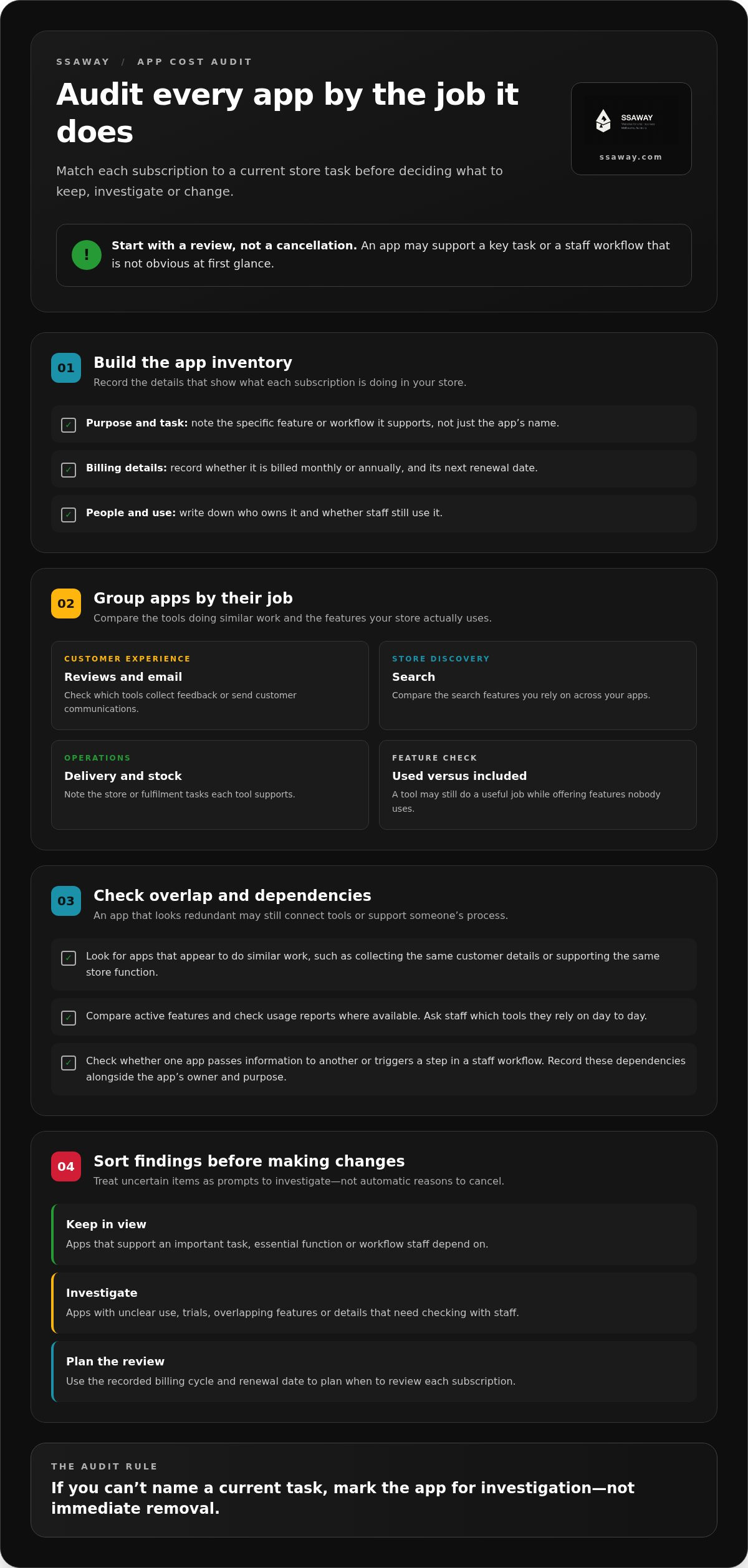
An app-cost audit matches every subscription to a current task in your store. For each app, record its purpose, billing cycle, renewal date, owner and whether staff still use it. Note the specific feature or workflow it supports, not just the app’s name. This gives you a clearer picture of your setup and a sound basis for exploring shopify app costs adding up alternatives. Shopify’s app marketplace is part of a wider Shopify platform ecosystem, but an app’s presence there doesn’t tell you whether it’s still useful for your business.
Which Shopify app subscriptions deserve a closer look?
Group apps by their job, such as collecting reviews, sending email, improving search or managing delivery and stock. Then compare the features you actually use with the reason you chose each app. A review tool might still collect feedback while offering other features nobody uses. That’s a reason to review its fit, not proof that the subscription is wasteful.
Note whether each app is billed monthly or annually, and when its next renewal falls. This helps you plan a review before another billing period starts. Record the business task it supports, too. If you can’t name a current task, mark the app for investigation rather than removing it straight away.
How do you spot overlapping apps and unused features?
Look for apps that appear to do similar work, such as collecting the same customer details or supporting the same store function. Compare their active features and check usage reports where available. Ask staff which tools they rely on in their day-to-day work. A feature that looks unused in an account may still support a process someone depends on.
Check connections between apps before making changes. One tool may pass information to another or trigger a step in a staff workflow. Record those dependencies alongside each app’s owner and purpose. Trials and overlapping features are useful prompts for an audit, not automatic reasons to cancel. Keep tools that support important tasks, and investigate unclear ones before deciding what to change.
Shopify app alternatives: understand native features, app bundles and custom development
Once you know what each app does, compare ways to handle the task. Fewer subscriptions don’t always mean less effort or risk. The right alternative depends on the task, its dependencies and the work needed to maintain it. If you’re weighing shopify app costs adding up alternatives, compare four options: Shopify’s built-in features, consolidating apps, selective custom development and a wider rebuild.
| Option | May suit | Trade-offs and questions to check |
|---|---|---|
| Built-in Shopify features | A straightforward task already supported by your plan | May reduce reliance on a separate app, but check plan limits, setup effort and whether the feature covers your exact needs. |
| One app instead of several | Apps with genuinely overlapping jobs | Could simplify management, but confirm it supports every required workflow, data connection and feature. |
| Custom development | A stable, specific requirement that off-the-shelf tools don’t meet well | Can be tailored to the task, but requires testing, upgrades, maintenance and clear future ownership. |
| Wider rebuild | Structural store needs that go beyond app overlap | May offer a better fit, but involves more planning and change. Compare the full setup and ongoing work, not just app charges. |
Can Shopify’s built-in features replace an app?
Start with the exact task, then check your Shopify plan and current documentation to see whether built-in tools cover the features you use. A basic setting or simple workflow may be different from a specialist function that depends on a dedicated app. Don’t assume a feature is included just because Shopify offers something similar. Confirm plan access, limits and the details your store relies on before switching.
When does app consolidation or custom development make sense?
Consolidation is worth exploring when apps overlap and one replacement can handle the workflows you need. Check its feature coverage, data connections and staff processes first. Otherwise, you may trade several subscriptions for a tool that leaves a gap. Custom development may suit a lasting, clearly defined need, but compare more than the initial setup. Decide who will test it, maintain it, update it and manage it over time.
If your audit points to a structural website need rather than an app problem, an ecommerce website package or tailored development may be another path to consider. SSAWAY’s projects require no upfront payment, and you can review and approve the completed website before payment.
Keep Shopify or change your website? Compare the real trade-offs
A growing app bill doesn’t automatically mean your Shopify store needs replacing. The issue may be a handful of overlapping tools, not the platform itself. Before weighing shopify app costs adding up alternatives, compare your current setup with the work involved in a targeted rebuild or a move to another platform. Use your own records for subscriptions and ongoing work, and don’t assume a change will save money.
Look at the whole operating picture: catalogue complexity, checkout requirements, integrations, data portability and how familiar staff are with the current system. A new setup may address a persistent limitation, but it also brings migration, training and testing. Compare those demands with the work of staying and improving what you already have.
When is keeping Shopify and trimming apps the sensible choice?
Keeping Shopify may be the practical option if core tasks such as managing products, taking orders and fulfilling them work as expected, and only a few apps need review. Consider how a change could affect staff routines and the customer experience. A convenient feature may be removable; one central to checkout or fulfilment needs more care. Check its connections to other apps before making a change.
When should a merchant consider a broader website rebuild?
Repeated workarounds, persistent platform limits or brittle integrations can point to a wider issue. Compare a rebuild or platform change when those problems affect essential work, not just because subscriptions have accumulated. Map the effort involved in moving content and data, recreating integrations, testing checkout and preserving search visibility. Migration needs planning, so don’t treat it as a simple swap.
A targeted rebuild may address a specific gap while leaving other parts of your setup unchanged. A broader move affects more of the business. Compare both options with staying on Shopify, including the ongoing work required to support each one.
- Catalogue: Does the product range and its organisation fit the current setup?
- Checkout and fulfilment: Which steps must keep working without interruption?
- Integrations and data: What connects to what, and what information needs to move?
- People and upkeep: How much retraining, testing and ongoing management will each path require?
Write down the expected work and risks for each option, then compare them using your store’s own records. For a broader look at fit, read about ecommerce website packages and how to choose. The right decision supports your store’s actual needs, not simply the option with fewer apps.
Reduce Shopify app costs safely with a staged review
Removing a subscription is only useful if the store keeps working as intended. Use a staged review: inventory apps, rank their business importance, check dependencies, test alternatives, then remove apps selectively. This gives you a clear process for assessing shopify app costs adding up alternatives without turning a cost review into an avoidable store disruption.
- Inventory: Record each app’s purpose, billing cycle, owner and active use.
- Rank importance: Mark which tasks are essential to customers or daily operations.
- Check dependencies: Trace connections to other apps, theme code, scripts and staff workflows.
- Test alternatives: Define how you’ll assess the task the app performs, then trial a replacement before changing the live setup.
- Remove selectively: Make one change at a time, then review store behaviour and app usage before the next billing cycle.
What should you check before uninstalling a Shopify app?
Read the app’s current removal guidance and identify information you need to export or retain. Document its settings, data needs and workflows, then check whether theme code, scripts, integrations or another app depend on it. Record how a key order or notification process currently works. If something changes after removal, you’ll have a useful reference for tracing the cause.
How do you test an alternative without disrupting sales?
Define what success looks like before changing anything. Test the customer and staff steps the app supports, including checkout, notifications, integrations and the mobile experience. Use a controlled test where possible, and keep a rollback plan so you know how to restore the previous setup if a key task fails. After the change, monitor store behaviour and usage through the next billing cycle before deciding whether the alternative is working.
Keep a short change log: what you changed, when, what you tested and what happened. That makes it easier to judge whether the new setup still meets the store’s needs, rather than relying on memory or the subscription total alone. For broader planning, read this transparent guide to Australian website design costs.
If your review points to a wider ecommerce website need, SSAWAY offers ecommerce website packages and custom development. There’s no upfront payment, and you can review and approve the completed website before payment.
Choose a lower-cost Shopify app alternative that still fits your business
Your app review should lead to a practical decision, not a blanket purge. Keep apps that support essential store tasks. Replace genuine overlap only when another option covers the workflows you rely on. Consider custom development or a broader rebuild when the audit points to a lasting requirement that your current setup can’t handle well. The right choice depends on fit and ongoing work, not simply a lower subscription total.
Which alternative fits your store’s current needs?
Match the solution to the problem you found:
- Simple task: Check whether a Shopify feature can do the job on your current plan, and confirm it covers the exact functionality you need.
- Duplicate app functions: Consider consolidating only if one option supports the required features, data and connected workflows.
- Specific, lasting requirement: Scope tailored development if it addresses a clear need and you can account for testing, maintenance and future ownership.
- Structural website issue: Consider a rebuild when limitations affect more than one app or keep forcing workarounds.
None of these routes guarantees savings. Compare your own app charges with the expected setup and ongoing work, and choose the option that supports your store without adding unnecessary complexity. If you’re weighing a broader change, this guide to affordable website design for Australian small businesses can help you think through the next step.
What should you expect from a website project?
If the audit reveals a wider ecommerce need, SSAWAY’s ecommerce website packages provide a way to plan a store around your business requirements. Custom web development can address a specific website function or structural need. The scope is shaped around the project, rather than assuming every store needs a full rebuild.
There’s no upfront payment. You review and approve the completed website before payment. This gives you an opportunity to assess the finished work, without a promise that changing your website will reduce every ongoing cost.
To discuss your store’s goals and app-related pain points, outline what your current setup needs to do.
Make your next store decision with confidence
The practical answer to shopify app costs adding up alternatives starts with understanding what each subscription does. Keep apps that support essential work, replace genuine overlap only when key workflows remain covered, and check dependencies before making changes.
Then compare the effort and risk of optimising Shopify with the demands of a rebuild or platform change. A growing app bill alone isn’t proof that your store needs replacing. Let your store’s actual needs guide the next step.
If your review points to a broader ecommerce need, SSAWAY offers ecommerce website packages and custom development. There’s no upfront payment, and you can review and approve the finished website before payment. Assess the completed work against your needs without assuming it will reduce every ongoing cost.
Discuss your ecommerce website or development project and share what your store needs to do. A careful review puts you in control and helps you choose a considered next step.
Frequently Asked Questions
Why are my Shopify app costs adding up?
Shopify app costs can build when subscriptions overlap, annual renewals go unnoticed or apps stay installed after a trial or campaign. If you're looking for shopify app costs adding up alternatives, first list each app, its purpose, billing cycle and actual use. Then mark whether its function is essential, duplicated or inactive. Don’t uninstall anything until you understand its connections to your store, workflows and data.
Can Shopify’s built-in features replace paid apps?
Sometimes, but it depends on the task, your Shopify plan and the features currently available to your store. Compare the native option with the workflow you rely on, including reporting, integrations and staff access. Check current Shopify documentation before making changes. If a built-in feature doesn’t cover an essential requirement, keep the app or find a suitable replacement rather than relying on a workaround that leaves a gap.
What are the alternatives to paying for multiple Shopify apps?
Options include using suitable Shopify features, consolidating overlapping apps, commissioning targeted development or reviewing the website setup more broadly. Each has trade-offs. A built-in feature may have limits, a combined app still involves an ongoing subscription, and custom development needs testing and maintenance. Match the option to the task, check that it supports required workflows and data, then test it before removing an app you already rely on.
Is custom development cheaper than Shopify apps?
Not automatically. The answer depends on the development scope, how long you’ll use the solution and the work needed to maintain it. A subscription may suit a standard function, while tailored development may fit a stable requirement that several apps don’t handle well. Compare the full commitment over your expected timeframe, including updates, testing and ongoing support. Don’t assume either a subscription or custom work will guarantee savings.
Will uninstalling a Shopify app affect my store?
It can, depending on what the app controls and how it connects with your theme, data or other tools. Before uninstalling, read its removal guidance, export information you need and check connected workflows. Record how key tasks currently work, then test customer-facing pages, checkout and staff processes after making a change. Monitor important store activity afterwards so you can respond if something behaves differently than expected.
Should I leave Shopify if my app costs are too high?
Not necessarily. First check whether essential functions, overlapping tools or unused subscriptions explain the total. If your core store workflows work, reviewing a small number of apps may be a simpler first step than changing platforms. Consider a rebuild or move only if limitations are broader and persistent. Compare migration, data transfer, testing, staff workflows and ongoing upkeep alongside app charges before deciding what suits your business.


