

What if the cost of a Squarespace sale isn’t one fee, but several charges added together? That’s the detail behind squarespace hidden transaction fees. The monthly plan price is easy to spot. Less obvious is that a platform transaction fee and a payment-processing fee may both affect what you keep from a sale.
These charges are separate, and which ones apply can depend on your plan, what you sell and how customers pay. Rates can also vary between countries and change as Squarespace updates its plans.
This guide explains which charges may apply to physical products, digital products and memberships, and how to check current Australian rates against Squarespace’s official information. You’ll also learn how to compare a plan’s real cost with your sales mix, payment options and website requirements. That gives you a clearer basis for weighing a DIY platform against a professionally built website, without confusing design fees with platform or payment-provider charges.
Key Takeaways
- Understand what “squarespace hidden transaction fees” can include, and how platform fees differ from payment-processing charges.
- Identify how your plan and sale type affect the fees that may apply to each transaction.
- Use current Australian information from Squarespace and your payment processor to verify rates before calculating costs.
- Calculate the cost of a sale by separating any transaction fee, processing charge and recurring website subscription.
- Compare those costs with your sales needs and the time you want to spend managing your website.
Squarespace hidden transaction fees: what the charges actually mean
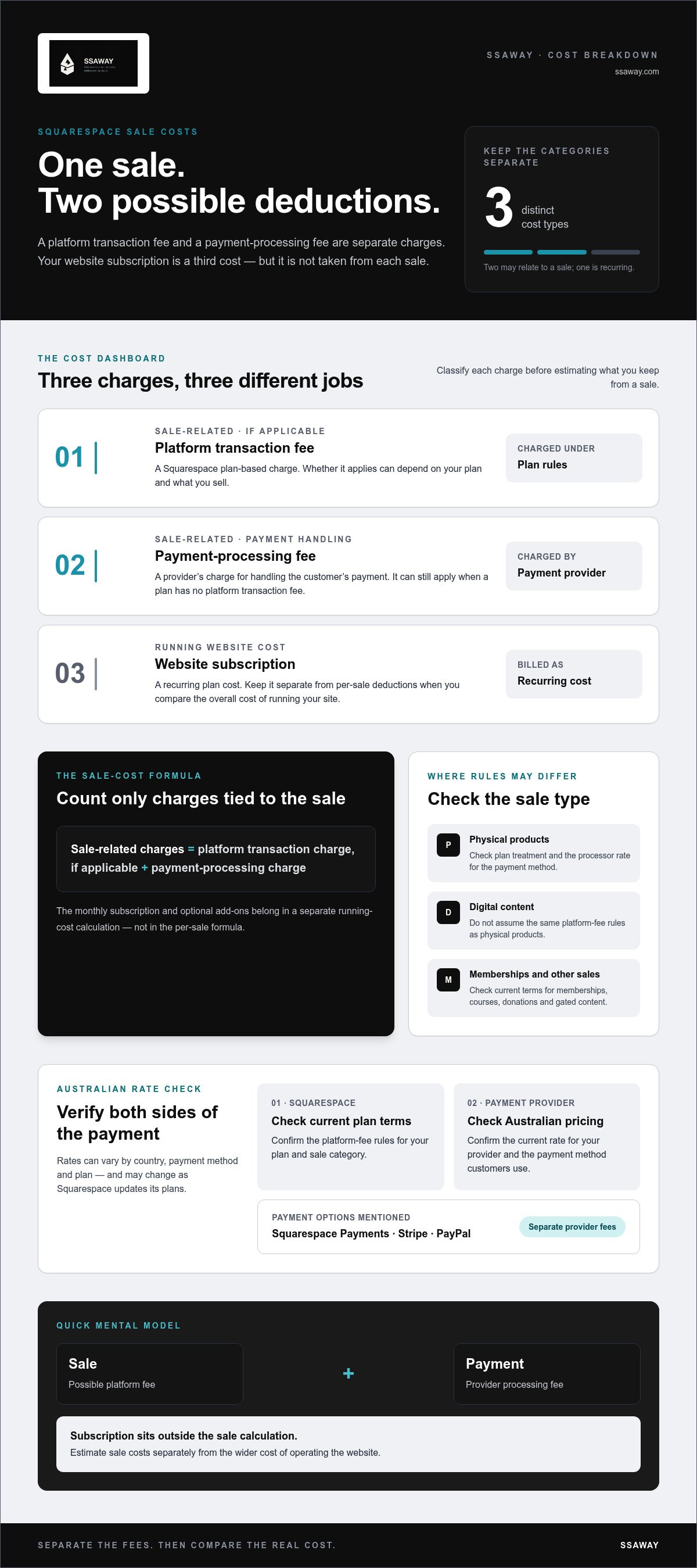
“Squarespace hidden transaction fees” can refer to two different charges: a platform transaction fee and a payment-processing fee. They’re separate costs, and whether both apply depends on what you sell, your plan and how the customer pays. A monthly subscription is a third cost, but it isn’t taken from each sale.
“Hidden” can simply mean easy to miss. If a charge is set out in plan terms or payment-provider pricing, it isn’t necessarily hidden, even if the headline subscription price doesn’t make it obvious. The practical question is which charges apply to your sales and how they affect the amount you receive.
What is a Squarespace transaction fee?
A Squarespace transaction fee is a platform charge that may apply to a sale under certain plans or for certain sale types. It’s distinct from the fee charged by the service that processes the customer’s payment. Don’t assume every plan or sale category attracts the same platform fee. For example, the rules may differ between physical products and digital content, so check the terms for the plan and sale category you use.
A platform transaction fee is charged under Squarespace’s plan rules; a processing fee is charged for handling the customer’s payment. If both apply, they’re separate deductions, not two names for one charge. That distinction matters when you estimate your take-home amount or compare plans. A plan with no platform transaction fee may still have a payment-processing fee.
What is a payment-processing fee?
A payment provider handles the customer’s payment and charges for that service. On an Australian Squarespace site, the processing option may be Squarespace Payments or a third-party provider such as Stripe or PayPal. These are separate options, and their fees don’t become Squarespace platform fees just because the payment is made through a Squarespace website.
Processing rates can depend on the country, payment method and plan. A card payment may be priced differently from another payment method, and a rate published for a different country may not apply to an Australian business. Check the provider’s current Australian pricing and your Squarespace plan details rather than relying on an old comparison or a rate quoted for another market.
Card processing can also involve underlying costs such as interchange, the fee associated with card transactions between financial institutions. The Interchange fee reference explains the term. It helps show why payment processing is its own cost category, separate from a website platform’s plan-based charge.
Keep the three cost types separate:
- Platform transaction fee: a possible charge under Squarespace’s rules for a particular plan or sale type.
- Payment-processing fee: a provider’s charge for handling the payment.
- Subscription: the recurring cost of the website plan, separate from each sale.
Once you know which category each charge belongs to, “hidden” becomes less useful than a clearer question: which fees apply to your sales, and where are they disclosed?
How Squarespace transaction and payment-processing fees can stack
One sale can result in two separate deductions. Use this simple formula:
Sale-related charges = platform transaction charge, if applicable + payment-processing charge
The same sale can attract a Squarespace platform fee and a separate payment-processing fee. The first depends on plan terms and sale type. The second is charged by the provider handling the customer’s payment. A plan with no platform transaction fee can still have processing charges.
Your website subscription sits outside this formula. It’s a recurring cost for the plan, not a charge taken from each order. Optional add-ons are another category. They may be billed separately for an extra tool or service, rather than deducted whenever a customer pays. Check how each cost is billed before treating it as a per-sale fee.
Which fees may apply to an online store sale?
For a physical product sale, first check whether your plan applies a platform transaction fee to that type of order. Then check the rate for the payment method and processor the customer uses. These are separate checks: a zero platform fee doesn’t mean payment processing is free. A customer buys an item, the provider processes the payment, and any plan-based transaction charge may also apply.
Keep the monthly plan cost separate when comparing individual orders. It affects the overall cost of running the store, but it isn’t another deduction from that payment. This distinction makes your estimate clearer and avoids counting the subscription as a transaction fee.
Can digital products, memberships or other sales work differently?
Yes. Squarespace’s rules may vary by sale category, so don’t assume a physical product’s fee treatment also applies to digital content or recurring access. Check the current terms for courses, memberships, donations and gated content, including the platform fee and the processor’s rate. US-based percentages or an old plan comparison aren’t a reliable substitute for current Australian information.
To estimate the amount left from a sale, start with its value, then account for any applicable platform charge and payment-processing charge. Keep any monthly subscription and optional add-ons in a separate running-cost calculation. This gives you two useful views: the cost attached to each sale and the wider cost of operating the site.
Some businesses consider passing payment costs on to customers. That’s separate from Squarespace’s fees. Before adding a card surcharge, read the ACCC guidance on card surcharges and understand the relevant requirements for your business.
If you’re weighing recurring platform costs against a professionally built e-commerce site, compare the full cost categories side by side. SSAWAY’s website options include fixed-price packages, with no upfront payment and approval of the finished website before payment. Website design fees remain separate from platform and payment-provider charges.
Compare Squarespace fees by plan, payment method and Australian location
Plan names and rates can vary by market, and older accounts may still show different plan names. The table uses the current Australian plan names and rates checked against Squarespace’s official information on 15 October 2026. Processing rates are provider-specific: the fee depends on the payment method and, for some providers, the plan.
| Plan or payment option | Sale category | Platform fee | Processing fee | Verification date |
|---|---|---|---|---|
| Basic | Online store sale | 2% | Squarespace Payments, domestic card: 2.9% + A$0.30 | 15 October 2026 |
| Core | Online store sale | 0% | Squarespace Payments, domestic card: 2.9% + A$0.30 | 15 October 2026 |
| Plus | Online store sale | 0% | Squarespace Payments, domestic card: 2.7% + A$0.30 | 15 October 2026 |
| Advanced | Online store sale | 0% | Squarespace Payments, domestic card: 2.5% + A$0.30 | 15 October 2026 |
| Basic / Core / Plus / Advanced | Digital content or membership | 7% / 5% / 1% / 0%, respectively | Check the selected processor and payment method | 15 October 2026 |
| Stripe, third-party option | Successful card transaction | Squarespace plan fee may still apply | 2.9% + A$0.30 for businesses under A$1 million annual volume | 15 October 2026 |
| PayPal, third-party option | Payment made through PayPal | Squarespace plan fee may still apply | Varies; verify current Australian rate | 15 October 2026 |
Use these figures as a comparison point, not a substitute for checking your account. Confirm your exact plan, sale category and processor terms before calculating costs. If the rate or plan name shown in your account differs, verify the current Australian terms directly with Squarespace or the payment provider.
Do Squarespace fees vary between Australian and overseas accounts?
Yes. Processing rates can vary by country, business location and payment method. Use Australian pricing, not US-focused round-ups: a rate quoted for another country may not apply to your account. The table lists domestic-card rates for Squarespace Payments. International-card or currency-conversion charges aren’t included, so check the current provider terms for those details before relying on a total.
How do plan and payment-provider choices affect fees?
Changing processors doesn’t automatically remove a Squarespace platform fee. Compare the plan charge and processor charge as separate line items. Stripe’s published rate may differ from Squarespace Payments’ plan-based rates, while PayPal’s fees vary. Neither option is universally cheaper once your sales mix and plan rules are considered. For broader Australian price context, see this Australian web design cost guide. If you sell online, this e-commerce website package guide can help you compare site needs alongside payment costs.
How to calculate and check your Squarespace transaction costs
To find what a sale actually costs, trace it from the type of purchase to the charges recorded in your account. Don’t rely on a general estimate alone. Your plan, payment method and transaction date all matter when checking squarespace hidden transaction fees.
- Identify the sale type. Record whether it was a physical product, digital product, membership or another kind of sale. Plan rules can differ by category.
- Check your plan rules. Use Squarespace’s current Australian fee guidance to see whether a platform transaction fee applies to that plan and sale type.
- Confirm the processor’s rate. Check the Australian rate for the payment provider and method used for that specific transaction. Include any percentage and fixed charge listed in the provider’s terms.
- Review the transaction record. Compare the charges shown in your Squarespace account or payment-provider records with the plan, sale type, payment method and date.
A simple formula for estimating fees on a sale
Use the sale value and verified rates to estimate the sale-related charges:
Estimated sale fees = (sale value × platform fee rate, if applicable) + (sale value × processing rate) + fixed processing charge
Leave the inputs blank until you’ve checked the rates that apply to your Australian account:
(A$[sale value] × [platform rate]) + (A$[sale value] × [processing rate]) + A$[fixed charge] = A$[estimated sale fees]
If a platform fee doesn’t apply, enter zero for that component. Don’t add your monthly website subscription or optional add-ons to this per-sale calculation. Track them separately as recurring or additional costs. Refunds, disputes, taxes or currency conversion may also affect the final account result, so treat this formula as an estimate rather than a complete reconciliation.
The effective fee is all relevant charges for a sale divided by that sale’s value. To express it as a percentage, multiply the result by 100. This gives you a consistent way to compare transactions of different values, as long as you include only charges that relate to each sale.
Where can you check fees applied to a Squarespace transaction?
Open the transaction or payment details in your Squarespace account and compare the recorded charges with the official fee guidance for your plan and payment method. Match the sale category and transaction date too. A fee or plan change can mean an older transaction follows different terms from a recent one.
Keep a dated note of the relevant plan terms and processor rates whenever they change. Include the source, date checked and type of sale covered. This record makes it easier to explain differences between your estimate and account statements later.
If you’re comparing sale costs with the cost of a professionally built site, explore a website option for your business. Website design fees are separate from platform subscriptions and payment-provider charges.
Should you keep Squarespace or compare another website option?
There isn’t one right answer for every Australian business. Squarespace may suit you if you value an integrated platform, want to manage the site yourself and will use the selling tools included in your plan. Weigh those conveniences against your recurring subscription and the charges that apply to your sales. Don’t judge the platform on its plan price alone.
When can Squarespace fees still represent fair value?
A platform can represent good value when its built-in tools fit the way you sell and you’re comfortable maintaining the website. Consider your sales volume, whether you sell physical products, digital content or memberships, and which features you’ll actually use. Then compare the plan cost and applicable per-sale charges with the time and work involved in managing the site yourself.
Use your own sales mix to make the comparison. A plan that suits a shop selling mostly physical products may not suit a business offering memberships. There’s no universal best plan: the answer depends on the current Australian terms and the charges that apply to your transactions.
- Sales volume: Consider how recurring charges and per-sale fees affect your expected sales.
- Sale types: Check the rules for each category you sell, not just your main product.
- Required features: Count the tools you’ll genuinely use, rather than paying for features that don’t support your business.
- Time and control: Decide whether you want to build and manage the site yourself or prefer a professionally built option.
The phrase squarespace hidden transaction fees can make every charge sound like a reason to leave. It’s more useful to calculate your actual costs, confirm the current terms and decide whether the tools and control you get are worth that total for your business.
What should you compare before choosing a professionally built website?
Keep project costs and ongoing costs in separate columns. Compare what the website project covers, then assess platform subscriptions, domain costs and payment-provider fees separately. A design fee doesn’t remove or replace those ongoing charges. Also consider who will manage the site and what responsibilities you’ll have after it’s built.
SSAWAY offers fixed-price website and SEO packages, including e-commerce websites and custom development. There’s no upfront payment; you review and approve the finished website before paying. That process lets you assess the completed work before payment, while keeping the website project fee distinct from any platform, domain or payment-provider costs that may continue.
Compare the options against your sales needs, required features and preferred level of involvement, then choose the setup that makes sense for your business. Explore straightforward website design options.
Choose the website setup that fits your next stage
Choose how you want your website built and managed, not just which fee looks lowest today. If you’re weighing squarespace hidden transaction fees against a professionally built option, consider the value of your time, the features your business needs and how much control you want over the site. Keep the website project fee separate from ongoing platform, domain or payment-provider costs. A different build approach doesn’t automatically remove those charges.
SSAWAY’s fixed-price website packages include SEO optimisation. There’s no upfront payment, and you can review and approve the finished website before paying. This gives you a clear project process to compare with building and managing a site yourself.
Take the next step with a clear view of what you need now and what you want your website to support as your business grows. Explore straightforward website design options and find an approach that feels right for your business.
Frequently Asked Questions
What are Squarespace hidden transaction fees?
The phrase usually refers to costs that aren’t obvious from the advertised plan price, especially platform charges or payment-processing fees. They may be listed in plan or provider terms, so “hidden” often means easy to miss rather than undisclosed. For a fair estimate, look at the plan attached to your account, the type of sale and the payment method used. Those details determine which charges to include.
Does Squarespace charge transaction fees in Australia?
Yes, some Australian plans and sale types can attract a Squarespace transaction fee. Under current plan rules, Basic has a 2% fee on online store sales, while Core, Plus and Advanced have no platform fee for those sales. Digital content and memberships follow different plan rates. Check the rules for your account and sale category, as plan terms can change and older accounts may use different plan names.
Are Squarespace transaction fees separate from payment-processing fees?
Yes. A platform transaction fee follows Squarespace’s plan rules; a processing fee is charged by the provider handling the customer’s payment. A single order can therefore have both types of charge, or no platform fee while processing still applies. For example, a store sale on a plan with no platform fee may still incur the payment provider’s card-processing charge.
Can I avoid Squarespace transaction fees by using Stripe or PayPal?
No. Switching to Stripe or PayPal doesn’t automatically remove a platform fee that applies under your Squarespace plan. It changes the payment processor, so you’ll need to include that provider’s charges as well. Stripe and PayPal have their own pricing terms, and PayPal’s fees vary. Compare the relevant Australian processor rate with your plan rules before deciding which payment setup suits your sales.
How much does Squarespace take from each sale?
There isn’t one rate for every sale. For Australian online store sales, Basic has a 2% platform fee; Core, Plus and Advanced have a 0% platform fee. Squarespace Payments domestic-card processing is 2.9% plus A$0.30 on Basic and Core, 2.7% plus A$0.30 on Plus, and 2.5% plus A$0.30 on Advanced. Digital content rates differ, so check the current terms for your sale type.
What happens if I refund a Squarespace order?
A refund reverses the customer’s purchase, but don’t assume every fee from the original payment will also be returned. The treatment can depend on the transaction, Squarespace’s terms and the processor’s refund policy. Review the refund entry and original payment in your account, then compare both with the provider’s current Australian terms. This helps distinguish the amount returned to the customer from any charges that remain.
Are Squarespace fees included in the website subscription?
No. The website subscription is a recurring plan cost, while transaction and payment-processing fees relate to sales. Optional add-ons may also be billed separately. For budgeting, keep these in separate categories: website plan, any domain or add-on costs, platform fees on eligible sales, and processing charges. This breakdown makes it easier to compare regular site expenses with costs that rise or fall with sales.
How can I check the fees charged on a Squarespace sale?
Open the transaction or payment details in your Squarespace account and compare the recorded charges with the plan and processor terms that applied on the sale date. Check the payment method and sale category too. If you reconcile transactions regularly, keep a record of the date, sale value, fee components and source rates. That makes changes easier to spot and gives you a clearer basis for reviewing your sales costs.