
A custom website isn’t automatically better than Wix. It’s a better fit only when your current site is getting in the way of a real business need. If you’re asking why switch from wix to custom website, start with what Wix can’t do for your business, not what sounds more professional.
Feeling boxed in by your layout or features is frustrating. Switching can also raise fair questions: what happens to your domain, your content and the search visibility you’ve built? Wix doesn’t let you export a finished site’s pages and design, so moving means rebuilding. That takes planning, but it doesn’t mean you have to rush or accept unnecessary disruption.
This guide will help you weigh the practical trade-offs. You’ll learn how a custom build can address specific limits, what to plan for when moving content and protecting search visibility, and how to assess ongoing management. We’ll also cover when staying with Wix makes sense, so you can make a measured decision for your Australian business.
Key Takeaways
- Workarounds, missing functions and awkward updates can signal that Wix no longer fits your business needs.
- Ask why switch from wix to custom website by naming the specific constraint you need to solve, rather than assuming a custom build is automatically better.
- Custom layouts and features can be tailored to documented needs, but customisation alone doesn’t guarantee faster loading, stronger security or better search rankings.
- Compare control, required features, everyday editing and maintenance responsibilities against what your business needs now and next.
- Plan a move methodically: list your content and essential functions, then map domain changes, redirects and launch checks before making the switch.
Why switch from Wix to a custom website? Start with the problem
A website can do its job today and still become a poor fit as your business changes. Perhaps your services have expanded, customers need a different way to interact with you, or routine updates take more effort than they should. That doesn’t automatically mean it’s time to leave Wix. It means there’s a problem worth identifying before you choose a solution.
A custom website is shaped around specific business requirements, rather than a one-size-fits-all layout. Website builders provide tools to create and manage a site without building every element from the ground up. A website builder may be a sensible fit if its tools meet your needs. The question is whether your current setup still does.
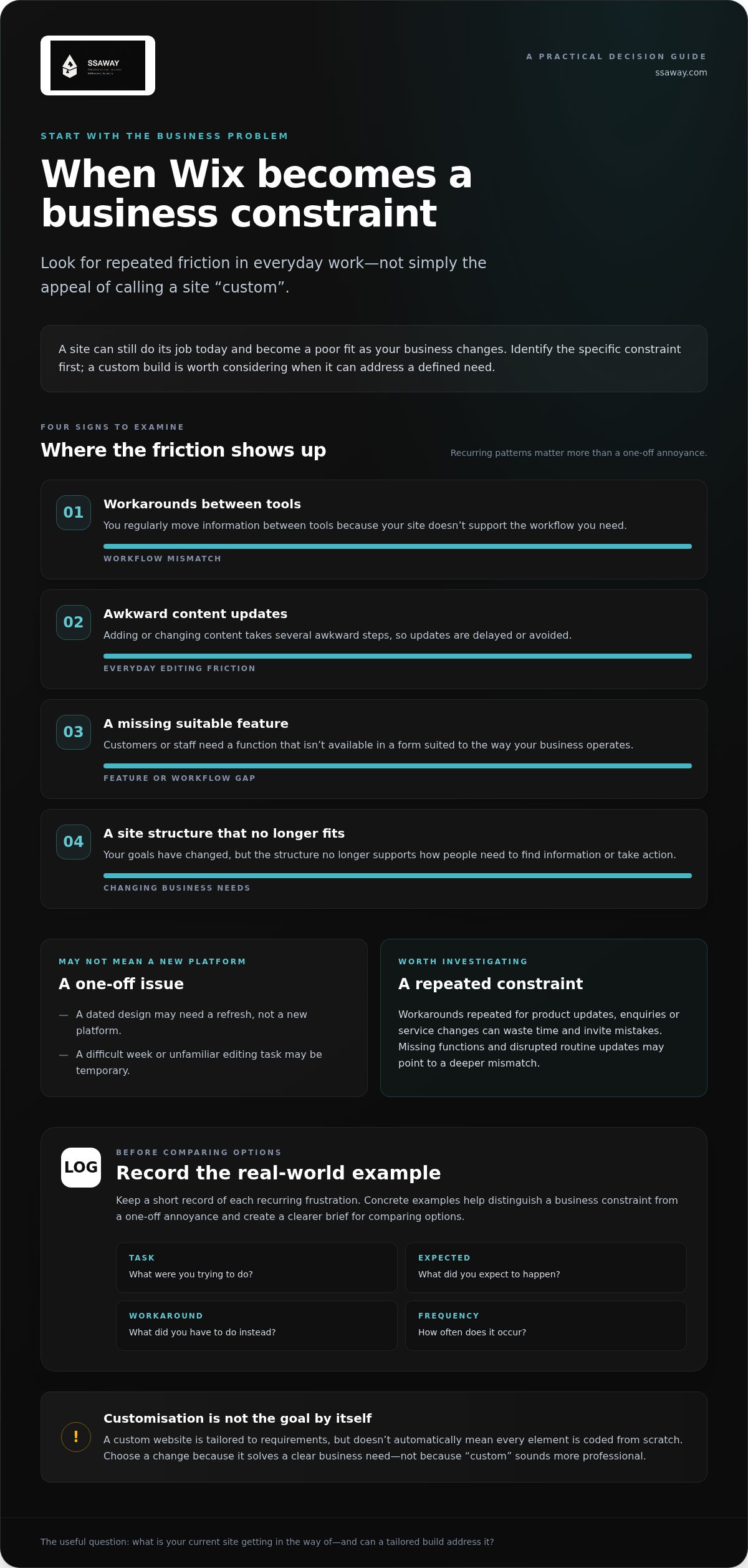
Identify what’s causing the frustration. A dated design may need a refresh, not a new platform. A difficult week or an unfamiliar editing task may be temporary. But repeated workarounds, missing functions and tasks that disrupt routine updates can point to a deeper mismatch.
Look for patterns such as:
- You regularly move information between tools because your site doesn’t support the workflow you need.
- Adding or changing content takes several awkward steps, so updates are delayed or avoided.
- A feature your customers or staff need isn’t available in a suitable form.
- Your business goals have changed, but the site’s structure no longer supports how you want people to find information or take action.
Which Wix frustrations are signs of a real limitation?
One workaround can be manageable. A workaround staff repeat for every product update, enquiry or service change can waste time and invite mistakes. Requirements for a specific workflow may also reveal a platform-fit issue. The question isn’t just whether a feature exists, but whether it supports the way your business operates.
Keep a short record before deciding to switch. Note the task, what you expected to happen, what you had to do instead and how often it occurs. Concrete examples help separate a recurring business constraint from a one-off annoyance. They also give you a clearer brief for comparing options.
Does a custom website mean every part is coded from scratch?
No. “Custom” describes a site tailored to your requirements, not necessarily one where every element is hand-coded. A build may use existing tools or components where they suit the job. The important distinction is whether the layout, features and workflows are selected to meet your needs, rather than simply choosing a template and accepting its limits.
A different template may solve a visual problem, but it won’t necessarily address a missing function or awkward process. Custom web development is worth considering when you can describe the constraint clearly and a tailored build can address it. That’s the practical answer to why switch from wix to custom website: change platforms to solve a defined problem, not to chase the label “custom”.
What a custom website can change, and what it cannot
A custom build gives you more room to shape a website around how your business works. That might mean a different page structure, a clearer path from service information to enquiry, or selected functions designed for a particular task. Start with documented requirements, not a wish list of features that look impressive but solve nothing.
For example, a business with several service types might need visitors to find the right information quickly. An online shop may need product categories arranged to suit its customers. In each case, ask: what do visitors need to do, and what does your team need to manage? Digital guidance, including resources from Digital.gov, also puts users’ needs at the centre of digital services.
Where custom development can offer more control
With custom development, requirements can shape page order, content flow and selected features. An integration should support a real workflow, such as reducing repeated data entry or helping customers complete a task. Adding tools just because they’re available can create extra complexity. More flexibility also brings more decisions, and a site still needs someone to manage its content and upkeep.
Keep ownership questions separate. Control over website design doesn’t automatically determine who owns your domain or where your site is hosted. Design describes how the site looks and works. Domain registration and hosting are separate arrangements, so include them in your project plan rather than assuming they change together.
Why a custom build is not an automatic performance or SEO fix
A different platform doesn’t guarantee faster loading, stronger security or higher search rankings. Performance depends on how the website is built and maintained, while search visibility also relies on useful content, a sound technical setup and whether search engines can access and understand the pages. A custom site can give a business more control over its choices, but control alone doesn’t deliver results.
Be specific about what you want to improve. If pages load slowly, identify where and under what conditions. If visitors struggle to find a service, review the content structure and the steps they need to take. If a page isn’t appearing in search, investigate its content and technical setup instead of assuming the platform is the only cause.
Responsibilities continue after launch. Someone needs to update details, publish new content, manage hosting arrangements and handle maintenance. The exact tasks depend on the site and how it’s built. Decide who will take them on, and how often, before treating a custom build as a hands-off solution.
That’s a more useful way to consider why switch from wix to custom website: identify specific changes a tailored build could make, then weigh them against the work required to manage it. For businesses with clear requirements their current setup doesn’t meet, custom web development can provide a website shaped around those needs.
Wix vs a custom website: a fair framework for comparing your options
A working Wix site may not need replacing. If it supports your business, customers can complete the tasks they came to do, and routine updates are manageable, staying put can be a sensible choice. Compare what each option asks of you now and what your business is realistically likely to need next. A balanced website builder vs. custom website comparison can help frame the trade-offs, but your requirements should lead the decision.
Use the table as a prompt, not a verdict. Mark each point as working well, causing friction or not yet understood. Then note what may change as your business grows: a larger range of services, a different way of handling enquiries, or a new customer journey. Separate likely needs from ideas that are still hypothetical. This makes the comparison useful rather than an argument for change at any cost.
When staying with Wix may be the sensible choice
If the site meets current needs, your team can make routine edits, and you aren’t repeatedly working around missing functions, there may be no business case for replacing it. A familiar editor and a limited feature set can be practical when they match the way you operate. Staying is a decision, too. A visual refresh may be enough if the issue is appearance rather than platform fit.
If the main concern is an outdated look or confusing page layout, consider whether a website design update could address it without changing more than necessary. The right scope depends on the problem you’re trying to solve.
When a custom website deserves serious consideration
A custom build merits a closer look when recurring limits clash with a clear requirement, such as a tailored path for customers or functionality that supports a specific business process. Write down what the site needs to do and how you’ll maintain it. When planning the scope of a project, use a web design project brief to define what the site needs to achieve, without assuming that switching platforms is automatically the answer.
So, why switch from wix to custom website? Only when the comparison points to a real constraint and a tailored build is a proportionate way to address it.
Moving from Wix to a Custom Site: A Detailed Guide
A smooth move starts with an inventory, not a domain change. Wix doesn’t export a finished site’s pages and design for direct use elsewhere, so plan to rebuild the site and transfer or recreate the content and functions you need. Keep the transition controlled: document what exists, map what’s changing, then test before launch.
Prepare the content, domain and technical requirements
Record each page, its URL and its purpose. Gather the copy, images, forms, product information and other content you plan to keep. List integrations and essential functions, such as how enquiries are received or bookings are handled. This inventory becomes the working brief for the new site and helps prevent important details from being missed.
Pay particular attention to URLs customers use or that appear in search results. Create a simple map showing each old address and the most relevant destination on the new site. If an address changes, plan a redirect to the equivalent page where possible. Sending every old URL to the homepage can leave visitors looking for the information they expected.
Your domain, DNS and website hosting are related, but they’re separate parts of the setup. The domain is your web address, DNS directs it to the right services, and hosting is where the website is made available. Decide which arrangements are changing and which are staying. Before making changes, follow the current Wix instructions and the steps for the new site’s platform. DNS settings vary, so don’t rely on a generic checklist for the final change.
Check the new website before and after launch
Use this ordered checklist to prepare:
- Confirm the page and content inventory, and check that essential text and images are present.
- Test navigation, forms, integrations and key journeys, such as finding a service and sending an enquiry.
- Review the site on mobile and desktop, including page layouts and contact details.
- Check page titles, indexing settings, analytics configuration and the redirect map.
- Follow the verified domain and DNS steps, then test the live site and its important links.
After launch, check priority URLs directly. Confirm that redirects land on the intended pages, forms still work and analytics is recording activity as expected. Watch for broken links and changes in search visibility, then investigate issues promptly. A redirect or indexing mistake can make a sound rebuild harder for visitors and search engines to use.
A broader rebuild may also be a chance to reconsider page structure and content, not just move existing material across. Treat it as a planned redesign, with clear decisions about what to keep, improve or remove. If you’ve documented the scope and are ready to shape the new site around it, plan your custom website transition.
Choosing your next step: a custom website built around your business
You don’t need to replace everything just because one part of your website isn’t working. Write down the specific constraint, compare the available options, then plan only the change that addresses it. A focused rebuild may be enough. In other cases, a different website format or a more tailored approach may better support the way your business needs to operate.
Match the website format to the job it needs to do
Start with the visitor’s task. A one-page website can bring a focused set of information together and guide visitors towards a clear action, such as making an enquiry. A shopfront website can present your business and what it offers. If customers need to browse and buy online, an e-commerce website is built around that buying journey.
Custom web development is worth considering when your requirements call for a more tailored approach than a standard format can provide. The aim isn’t to add complexity. It’s to make sure the structure and functionality support a real business need.
Make the project decision clearer before committing
A short, practical brief helps turn a general desire for a new site into a project with a clear purpose. Set out who the site is for, what visitors should be able to do, what content needs to be included and which functions are essential. Separate must-haves from nice-to-haves. That makes it easier to choose the right format and keep the scope focused.
If online selling is central to your plans, include the customer’s path from viewing products to completing a purchase in your brief. SSAWAY offers e-commerce website packages for businesses selling online, alongside one-page and shopfront website packages and custom web development. Each option serves a different purpose, so base your choice on what customers need to do and what your business needs the site to support.
SSAWAY’s projects are priced under A$1,000, with no upfront payment required. You can review and approve the finished website before payment. That gives you a practical way to judge whether the result fits the project brief you agreed on.
So, why switch from wix to custom website? If you’ve identified a specific need your current site doesn’t meet, and a tailored build is the right-sized solution, define that need clearly. Then choose a website format that fits your business, your content and the way you want customers to take action.
Make your next website move with purpose
Your next website decision doesn’t need to be a verdict on Wix. Treat it as a business choice: what should your site help customers do, and what’s getting in their way now? If your current setup still supports that job, keep it. If a clear constraint is blocking a customer journey or making essential work harder, plan a change that addresses that specific problem. The answer to why switch from wix to custom website should be a business outcome, not the appeal of a platform label.
Before you start, write a one-sentence goal for the new site. It will help keep decisions focused and make it easier to judge whether the finished result fits your needs. SSAWAY offers one-page, shopfront and e-commerce website packages, alongside custom web development. There’s no upfront payment required, and you can review and approve the finished website before payment.
Explore SSAWAY’s website packages and custom web development and start with a clear goal for your business website.
Frequently Asked Questions
Does switching from Wix to a custom website guarantee better Google rankings?
No. A custom build can give you more control over page structure and technical choices, but Google rankings depend on more than the platform. For example, changing page addresses without relevant redirects can make existing pages harder to reach, while a technically sound website still needs useful content to compete. Set a clear goal, such as improving the visibility of a particular service page, and monitor results rather than expecting a guaranteed ranking change.
Is Wix bad for SEO?
No. Wix isn’t automatically bad for SEO; results depend on how the site is set up and the quality of its content. Check whether search engines can access important pages, whether page titles accurately describe them and whether each page answers a customer’s question. Competition matters too. If a specific SEO task is proving difficult, identify the exact obstacle before deciding that a complete rebuild is the only solution.
Can I get a custom website without knowing how to code?
Yes. You can commission custom web development without writing code yourself. You’ll still need to explain what the site should do and provide or approve its content. Before the project begins, clarify how you’ll make everyday changes afterwards. For instance, decide who will update opening hours, service details or a seasonal announcement. That helps ensure the finished site suits both your customers and the way you manage your business.
Is a custom website always better than a website builder?
No. There isn’t one right option for every business. Ask why switch from wix to custom website only if a specific need makes the change worthwhile. A simple site with stable content may be easier to manage in a familiar builder. A business with a distinct customer process may value a more tailored build. Compare the work each option requires as well as the features it provides, including who will handle updates and maintenance.
Can I keep using my Wix account after moving my website?
Usually, you can keep an account even if your new website is hosted elsewhere, but the account and the live website are separate things. Before cancelling any Wix plan or app, review what it supports, including any domain or email services you still rely on. Domain registration and website hosting aren’t the same arrangement. Confirm which services you intend to keep and make account changes only after the new site is working.
What should I ask for in a custom website project brief?
Set out who the site is for, what visitors should be able to do and what content needs to appear. List required pages, essential functions and any services the site needs to work with. Add practical acceptance points, such as a working enquiry form or clear contact details on mobile. Also state what’s outside the project scope. Clear criteria make it easier to review the finished website against the work you requested.
Should I rebuild my Wix website if it is still working?
Not necessarily. If customers can find what they need and your team can manage the site without repeated friction, rebuilding may add work without addressing a pressing problem. Look for evidence before deciding: customer feedback, recurring editing difficulties or missed enquiries may point to a genuine issue. If the concern is mainly visual, consider whether a smaller design change would be enough. Choose the smallest practical change that solves the problem.